
In-Person Signing
Collect Signatures Face-to-Face, on Your Own Device.
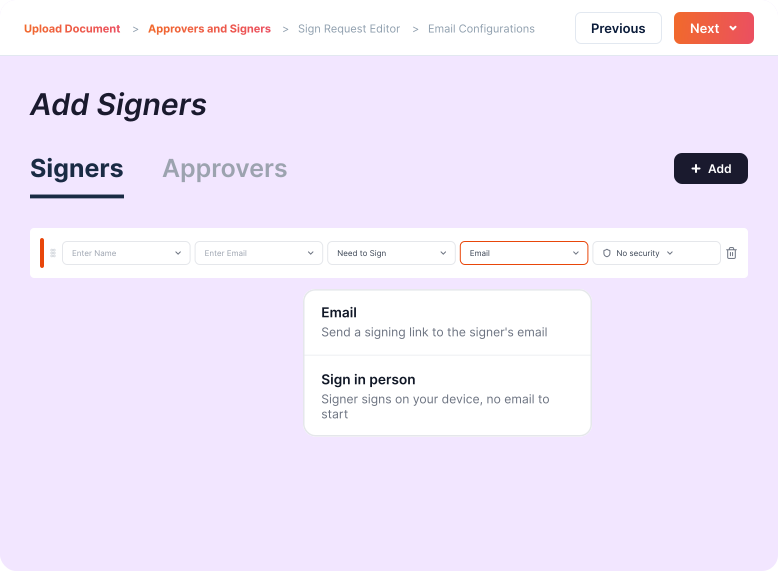
In-person signing collects a signature on your own device while the signer is with you. The host opens the document, hands it over, and the hand-off is recorded.
How In-Person Signing Works
You prepare the document exactly as you would for any other send. Only the delivery changes.
Why Teams Choose Inkfree In-Person Signing
Face-to-face signing closes the gap between agreeing and executing, without giving up the electronic record.
No Waiting on an Inbox
Signed while the person is still with you, instead of after three reminders.
Works When the Signer Has No Device
Yours is the only device in the room, and signers need no account or app.
One Document, Two Delivery Modes
Sign one party face-to-face and email the rest. Signing order applies across both.
Explore signing order
Details Captured as You Sign
No need for the signer's email in advance. Enter it at hand-off and confirm it face-to-face.
One Host at a Time, by Design
Two staff on two devices can never drive the same hand-off into a conflict.
The Same Record as Any Signature
Identical audit trail, Certificate of Completion, and encryption and compliance as remote signing.
See security & compliance
What an In-Person Signing Session Records
A host-led session is not a shortcut around the record. Inkfree logs five distinct in-person events, so the trail shows who held the device and when.
- In-person started
The host opened a session on this document. Logged once, with the host's name and email.
- In-person handoff
The device was passed to a named signer. One row per signer, so every hand-off in a multi-party session shows separately.
- Signed in person
The signer completed and signed on the host's device. The row names the accountable host as well as the signer.
- In-person returned
The host took the device back without the signer completing. The signer's status is left untouched.
- In-person abandoned
The host canceled the hand-off. Recorded distinctly from a return, so it stays visible in the activity history.
Where In-Person Signing Fits Best
Wherever the agreement and the person are already in the same room, a signing link only adds delay.
Point of Sale and Store Counters
Finance agreements, service plans, and terms signed at the counter while the customer is still there. Useful for retail teams closing at the till.
Clinic and Practice Intake
Consent and intake forms completed at the front desk on a shared tablet, which suits healthcare teams whose patients arrive without a phone.
Field Sales and Site Visits
Quotes, work orders, and service agreements closed at the kitchen table or on the job site, so the work is authorized before the visit ends.
Property Viewings and Walk-Ins
Applications and disclosures signed during the viewing itself. Real estate teams can then route the remaining parties by email.
Onboarding and Registration Desks
Waivers, handbook acknowledgments, and contractor agreements collected on one staffed device, a common need for HR and staffing teams.
Built for Every Industry.
Designed for Every Team.
From real estate closings to HR onboarding, Inkfree fits the way your team already works.
Don't see your industry?
Browse All SolutionsEverything Included with In-Person Signing
How host-led signing connects to the rest of the platform.
Per-Recipient Delivery
Choose in person or email for each recipient individually, on any document.
Blank Signer Placeholders
Prepare a document before you know who will sign it.
Multi-Signer Sessions
Move from one in-person signer to the next without restarting.
Signing Order Support
In-person signers respect the signing order you set.
Access Code Protection
Require an access code before their fields unlock.
Return or Cancel a Hand-Off
Take the device back without changing the signer's status.
Host-Attributed Signatures
Every signature names the staff member who hosted it.
Included on the Business Plan
See where it sits on the full plan comparison.

Questions, answered.What teams ask before running their first host-led session.
In-person signing is a session where sender and signer are physically together and the signature is collected on the sender's device. In Inkfree it is host-led: you start a session, hand the device over, and take it back once they have signed.
Yes. It carries the same tamper-proof audit trail and Certificate of Completion as any Inkfree signature, enforceable under the ESIGN Act, UETA, and eIDAS, plus a record of who hosted the session.
Not while building the document, but yes to complete the hand-off. Leave it blank when preparing and enter it face-to-face. That email identifies the signer and receives their signed copy.
Yes. When one finishes, you move the session on to the next. Any signing order is followed automatically, and where several signers sit at the same level you choose who goes next.
No, and that is deliberate. Only one host can run a session on a document at a time, so two devices never drive the same hand-off.
In-person (host-led) signing is included on the Business plan, alongside every other Inkfree feature on that tier.
Close the Agreement Before Anyone Leaves the Room.
Prepare the document once, hand over your device, and finish with a signed, fully audited agreement in hand.