
The Complete Guide to Electronic Signatures for Businesses
 Vatsal GotiLast Updated: Aug 18, 2026
Every business relies on contracts, agreements, and document approvals. Traditional paper-based signing slows operations down, increases costs, and creates unnecessary administrative work. Electronic signatures give businesses a secure, efficient way to send, sign, and manage documents online. This guide explains how electronic signatures work, their legal validity, the benefits they deliver, common business use cases, and the best practices for choosing the right electronic signature software.
Key Takeaways From This Guide
- Electronic signatures enable businesses to sign documents securely without printing or scanning.
- They help reduce paperwork, accelerate approvals, and improve operational efficiency.
- Electronic signatures are legally recognized in many countries when they comply with applicable laws and regulations.
- Secure electronic signature platforms provide encryption, audit trails, authentication, and document tracking.
- Businesses across HR, sales, finance, legal, procurement, healthcare, education, and real estate use electronic signatures to streamline document workflows.
- Choosing the right solution involves evaluating security, compliance, integration, scalability, and ease of use.
Electronic Signatures, Defined
An electronic signature is a legally recognized method of signing documents digitally instead of using handwritten signatures on paper. It allows individuals and organizations to indicate agreement or approval electronically using a computer, tablet, or mobile device.
Depending on the platform and the document requirements, an electronic signature may take several forms, including:
- Typing a name
- Drawing a signature with a mouse or touchscreen
- Uploading a handwritten signature image
- Clicking an "I Agree" button
- Using identity verification methods provided by the signing platform
Unlike traditional paper-based processes, electronic signatures simplify document management by allowing agreements to be prepared, shared, signed, tracked, and stored digitally.
Definition: An electronic signature is electronic data attached to or logically associated with a document that indicates a person's intent to sign or approve that document.
Traditional Signing vs. Electronic Signing
| Traditional Process | Electronic Signature Process |
|---|---|
| Print document | Upload document |
| Physically sign | Send electronically |
| Scan document | Sign online |
| Email attachment | Automatic delivery |
| Manual follow-up | Automated reminders |
| Physical storage | Secure cloud storage |
Modern electronic signature platforms replace multiple manual steps with a streamlined digital workflow, reducing delays and improving visibility throughout the approval process.
What Is Driving the Shift Away From Paper
Business operations are becoming increasingly digital. Hybrid work environments, remote collaboration, and customer expectations for faster service have made paper-based approval processes far less practical.
Organizations are adopting electronic signatures because they help:
- Accelerate contract approvals
- Reduce administrative workload
- Eliminate printing and shipping costs
- Improve collaboration across distributed teams
- Enhance document visibility and tracking
- Support compliance and audit readiness
- Deliver a more convenient signing experience
Rather than managing stacks of paperwork or waiting for documents to circulate manually, businesses can complete approvals from almost any location with a secure internet connection.
Business Challenges Solved by Electronic Signatures
| Challenge | How Electronic Signatures Help |
|---|---|
| Slow approvals | Enable faster document routing and signing |
| Lost paperwork | Centralize digital document storage |
| Manual follow-ups | Send automated reminders |
| Remote workforce | Allow secure signing from anywhere |
| Compliance concerns | Maintain detailed audit trails |
| High operational costs | Reduce paper, printing, and courier expenses |
Expert insight: Electronic signatures are not simply a digital replacement for handwritten signatures. They are a foundational component of modern document workflows, helping businesses improve efficiency, maintain compliance, and support secure collaboration across teams.
Common Reasons Businesses Make the Switch
Instead of waiting days for signatures, businesses can complete approvals within hours or even minutes, depending on the workflow. The most frequently cited reasons for switching include:
- Faster document turnaround
- Improved customer experience
- Better visibility into document status
- Reduced administrative work
- Easier collaboration across remote teams
- More consistent document management
How Do Electronic Signatures Work?
Electronic signatures simplify document approval by replacing manual, paper-based processes with secure digital workflows. Instead of printing, signing, scanning, and emailing documents, businesses can complete the entire signing process online in just a few steps.
While the user experience is straightforward, a reliable electronic signature platform performs several actions behind the scenes to maintain document integrity, verify signer intent, and create an auditable record of the transaction.
The Electronic Signature Workflow
Most electronic signature platforms follow a similar process.
1. Upload the Document
The sender uploads a document such as:
- Employment contracts
- Sales agreements
- NDAs
- Purchase orders
- Vendor contracts
- Client proposals
- Consent forms
Many platforms also support Word documents, PDFs, spreadsheets, and custom templates.
2. Add Recipients
The sender specifies:
- Who needs to sign
- The signing order, which can be sequential, parallel, or a mix of both
- CC recipients
- Document reviewers
This ensures every participant receives the correct version of the document.
3. Place Signature Fields
Instead of manually indicating where to sign, users drag and drop fields such as:
- Signature
- Initials
- Date
- Name
- Company
- Checkbox
- Text fields
This reduces mistakes and speeds up completion.
4. Send for Signature
Recipients receive a secure email with a unique link to access and sign the document. They can review and sign on a desktop, laptop, tablet, or smartphone without installing additional software.
5. Identity Verification
Depending on the document's sensitivity, organizations may require additional verification such as:
- Email verification
- One-time password (OTP)
- Multi-factor authentication (MFA)
- Government-issued ID verification
- Knowledge-based authentication, where available
The appropriate method depends on the organization's policies and applicable legal requirements.
6. Completion and Audit Trail
After all parties have signed:
- All participants receive the completed document.
- The platform records timestamps and signing events.
- The final document is stored securely.
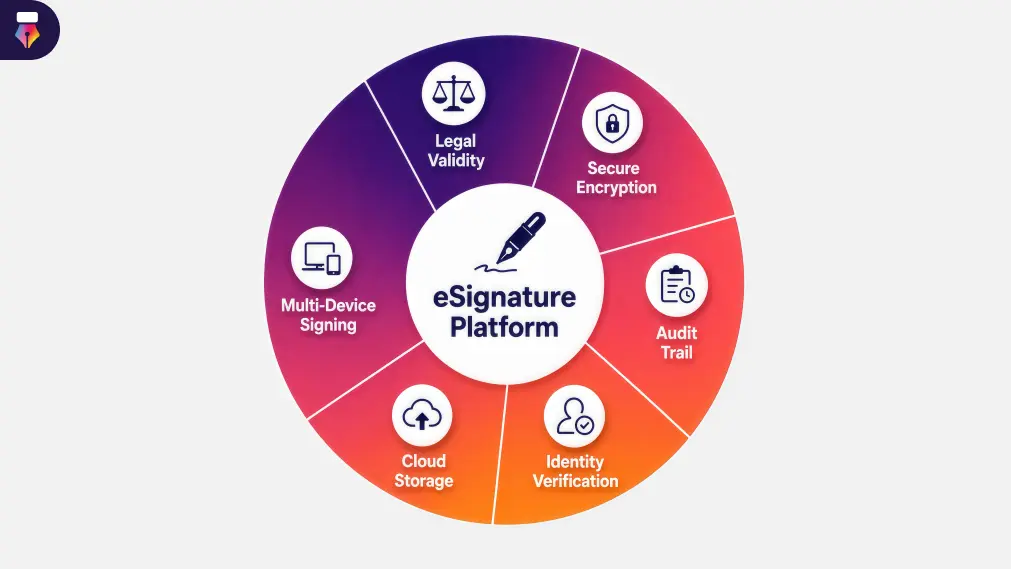
- An audit trail provides evidence of the signing process.
This creates a reliable record that supports compliance, accountability, and future reference.
The Workflow at a Glance
| Step | Traditional Process | Electronic Process |
|---|---|---|
| Create document | Manual | Digital |
| Send | Courier or email | Secure link |
| Sign | Pen and paper | Online signature |
| Track status | Manual follow-up | Real-time tracking |
| Reminders | Phone or email | Automated notifications |
| Storage | Filing cabinet | Secure cloud storage |
What Businesses Gain After the Switch
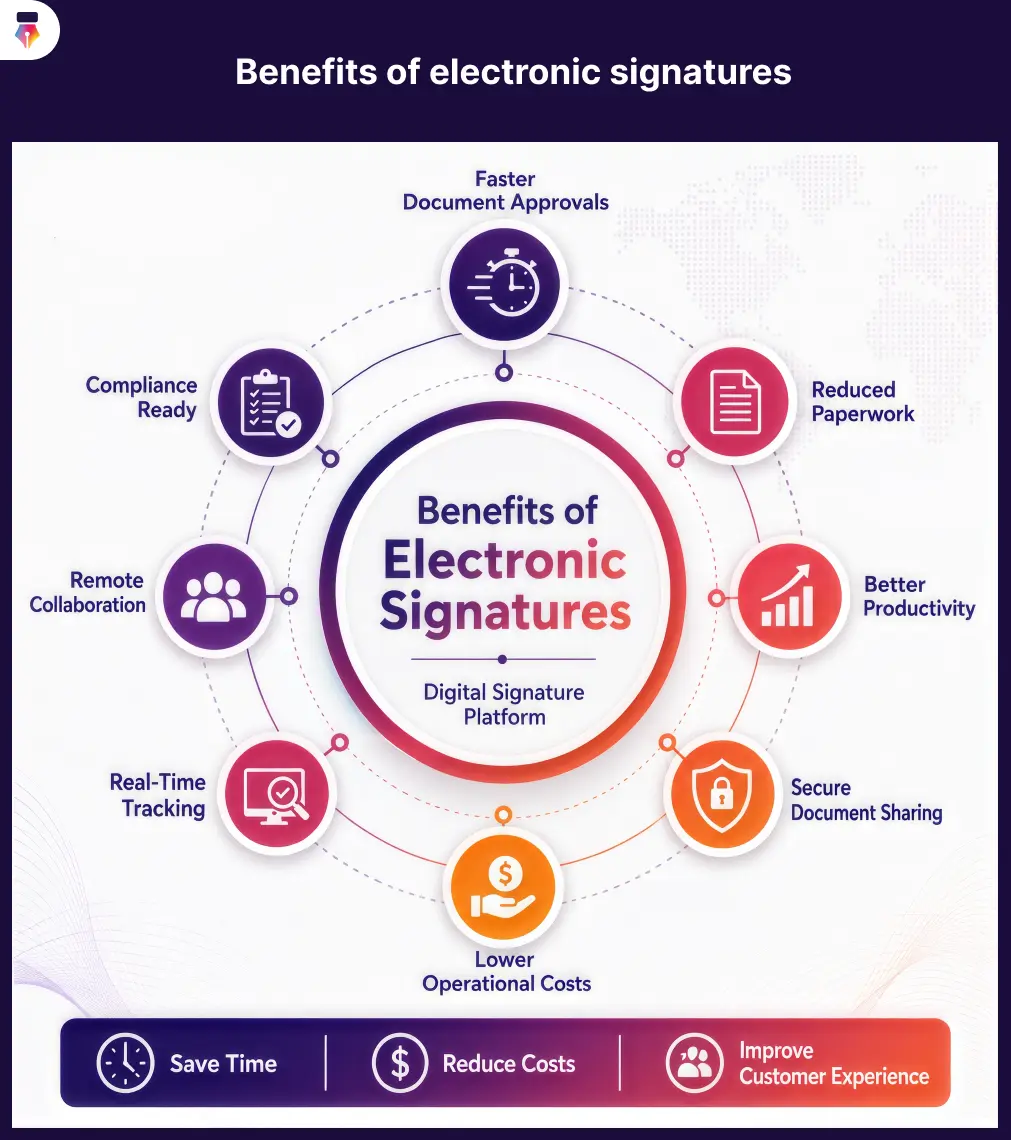
Electronic signatures deliver advantages across productivity, cost management, compliance, and customer experience.
1. Faster Document Turnaround
Traditional document approvals often involve printing, shipping, scanning, emailing, and manual reminders. Each step introduces delays. Electronic signatures streamline the process by allowing recipients to sign from almost anywhere, significantly reducing approval times.
2. Improved Business Productivity
Employees spend less time on administrative tasks and more time on work that creates value. Automated workflows help eliminate repetitive activities such as following up with signers, tracking document versions, updating approval status manually, and organizing paper records.
3. Better Customer Experience
Today's customers expect convenience. Electronic signatures allow clients to review documents online, sign from any device, and complete transactions without printing or scanning. A smoother signing experience reduces friction during onboarding, purchasing, and contract execution.
4. Reduced Operational Costs
Paper-based processes involve ongoing expenses such as printing, paper, ink, shipping, physical storage, and administrative handling. By digitizing document workflows, businesses can reduce many of these recurring costs.
5. Improved Security
Modern electronic signature platforms typically include encryption, access controls, audit trails, authentication options, and tamper-evident documents. These security and compliance capabilities help organizations maintain document integrity and improve accountability throughout the signing process.
6. Support for Remote and Hybrid Work
Distributed teams often need to review and approve documents across multiple locations and time zones. Electronic signatures enable secure collaboration without requiring employees or customers to be in the same office.
7. Better Compliance and Record Keeping
Businesses often need reliable records of approvals for operational, contractual, or regulatory purposes. Electronic signature platforms can help by maintaining signing history, timestamps, audit logs, document versions, and completion records. Organizations should confirm that their chosen solution supports the compliance requirements relevant to their industry and jurisdiction.
Paper Signing vs Electronic Signing, Side by Side
| Business Goal | Traditional Signing | Electronic Signatures |
|---|---|---|
| Speed | Slow | Fast |
| Collaboration | Office-based | Anywhere |
| Tracking | Manual | Real-time |
| Security | Limited | Enhanced controls |
| Storage | Physical | Digital |
| Scalability | Limited | High |
| Remote work | Difficult | Supported |
Scenarios Where the Difference Shows
HR team: A growing company hires employees across different cities. With paper-based processes, offer letters must be printed, signed, scanned, and emailed back, delaying onboarding. Using electronic signatures, HR can send employment documents digitally, monitor signing status, and complete onboarding much more efficiently.
Sales team: A sales representative closes a deal late on Friday. Instead of waiting until Monday for a printed contract, the proposal is sent electronically. The customer reviews and signs it over the weekend, allowing work to begin sooner.
Decision Matrix: Is an Electronic Signature Right for Your Process?
| Business Need | Recommended Approach |
|---|---|
| Employee onboarding | Electronic signature |
| Vendor agreements | Electronic signature |
| Sales contracts | Electronic signature |
| Internal approvals | Electronic signature |
| Low-risk acknowledgments | Electronic signature |
| Documents with special legal or regulatory requirements | Review applicable laws and organizational policies before choosing the appropriate signing method |
Where Teams Put Electronic Signatures to Work
Electronic signatures have evolved far beyond simple contract signing. Today, organizations use them to streamline approvals, reduce administrative work, and create more efficient document workflows across nearly every department.
From onboarding new employees to closing sales agreements, electronic signatures help businesses eliminate unnecessary paperwork while keeping processes organized and secure. Here is where they create the greatest business value.
1. Human Resources Paperwork
HR teams manage a large number of documents throughout the employee life cycle. Traditional paper-based processes can delay hiring, increase administrative work, and create storage challenges. Electronic signatures simplify HR documentation by allowing employees to review and sign forms online from any location.
Common HR documents
- Offer letters
- Employment agreements
- Employee handbooks
- Non-disclosure agreements
- Policy acknowledgments
- Performance review documents
- Exit paperwork
- Leave request approvals
Benefits for HR teams
- Faster employee onboarding
- Reduced paperwork
- Improved document tracking
- Better employee experience
- Centralized digital records
Business example: A company hiring remote employees can send offer letters electronically, collect signatures within hours, and complete onboarding before the employee's first day.
2. Sales Contracts and Proposals
Speed is often critical in the sales process. Waiting days for signed contracts slows deal progression and gives prospects time to reconsider. Electronic signatures let sales teams send proposals, contracts, and agreements immediately after negotiations conclude.
Common sales documents
- Sales contracts
- Service agreements
- Client proposals
- Renewal agreements
- Quotes
- Purchase confirmations
Benefits
- Faster contract execution
- Shorter sales cycles
- Improved customer experience
- Better visibility into document status
- Automated reminders for unsigned agreements
3. Legal Agreements and NDAs
Legal departments frequently manage contracts that require careful review, version control, and documented approval processes. Electronic signature platforms help organize these workflows while maintaining records of signing activities.
Common legal documents
- Contracts
- Vendor agreements
- Partnership agreements
- Licensing agreements
- Confidentiality agreements
- Settlement documents
Benefits
- Organized contract management
- Improved approval tracking
- Secure document history
- Reduced manual administration
4. Finance and Procurement Approvals
Finance teams regularly process invoices, purchase approvals, vendor contracts, and reimbursement requests, and procurement teams manage a steady flow of supplier paperwork. Electronic signatures help reduce delays and improve visibility throughout the approval process.
Common finance documents
- Purchase orders
- Vendor contracts
- Expense approvals
- Payment authorizations
- Budget approvals
Benefits
- Faster approval cycles
- Improved accountability
- Better audit readiness
- Reduced manual follow-up
5. Customer-Facing Agreements
Businesses across industries require customers to approve terms before services begin. Electronic signatures provide a convenient way for customers to complete agreements from any device.
Examples include:
- Service contracts
- Subscription agreements
- Account opening documents
- Customer consent forms
- Project approvals
This improves both customer satisfaction and operational efficiency.
Electronic Signatures Across Industries
Electronic signatures are valuable across organizations of all sizes and industries.
Healthcare Providers
Healthcare organizations use electronic signatures for patient consent forms, administrative documentation, vendor agreements, and internal approvals. Organizations should ensure their processes comply with the healthcare regulations applicable to their region.
Real Estate Brokerages
Real estate professionals often manage documents involving multiple stakeholders. Electronic signatures help simplify purchase agreements, lease agreements, property disclosures, and agent contracts. Transactions can continue even when buyers, sellers, or agents are in different locations.
Schools and Universities
Educational institutions use electronic signatures for student enrollment forms, parent consent forms, staff documentation, and vendor approvals. Digital document workflows reduce paperwork while improving administrative efficiency.
Manufacturing and Supply Chain
Manufacturers frequently manage supplier agreements, quality documentation, purchase approvals, and compliance records. Electronic signatures help accelerate approval workflows while improving document organization.
Banks and Financial Services
Banks and financial institutions commonly require signed documentation for loan applications, client onboarding, investment documentation, and account agreements. Organizations in this sector should implement signing processes that align with applicable financial regulations and internal security requirements.
Technology and Software Companies
Technology and SaaS companies sign master service agreements, NDAs, data processing agreements, and subscription renewals, many of which need legal and finance approval before the customer ever sees them. Electronic signatures keep the internal approval and the customer signature inside one tracked workflow, which helps enterprise deals close on schedule.
Electronic Signatures vs. Digital Signatures
These two terms are frequently used as if they mean the same thing, but they represent different concepts.
A digital signature is a specific type of electronic signature that uses cryptographic technology to help verify the authenticity and integrity of a document. An electronic signature is the broader concept of electronically indicating agreement or approval.
| Feature | Electronic Signature | Digital Signature |
|---|---|---|
| Purpose | Indicates intent to sign | Verifies authenticity and integrity |
| Technology | Various electronic methods | Public key infrastructure (PKI) or similar cryptographic methods |
| Security | Varies by implementation | Typically includes cryptographic protection |
| Common use | Business approvals, contracts, HR forms | High-security or regulated transactions |
Key takeaway: Every digital signature is an electronic signature, but not every electronic signature is a digital signature.
Are Electronic Signatures Legally Valid?
In many countries, electronic signatures are legally recognized when they meet the requirements established by applicable laws and regulations. The specific legal framework varies by jurisdiction, so businesses should evaluate the requirements that apply to the regions where they operate.
Examples of well-known legal frameworks include:
| Region | Example Framework |
|---|---|
| United States | ESIGN Act and UETA |
| European Union | eIDAS Regulation |
| India | Information Technology Act, 2000, with applicable provisions |
| United Kingdom | UK eIDAS framework and applicable electronic signature guidance |
The legal enforceability of an electronic signature often depends on factors such as:
- Intent to sign
- Consent to conduct business electronically
- Accurate association between the signer and the document
- Reliable record retention
- Compliance with applicable regulations
Businesses handling regulated or high-value transactions should obtain appropriate legal advice regarding their specific use cases. Our guide to the legal status of electronic signatures covers how signing methods compare in a dispute.
Staying Compliant Once You Go Digital
When adopting electronic signatures, organizations should look for solutions that offer:
- Audit trails
- Encryption
- Access controls
- Identity verification
- Secure document storage
- Document version history
- Activity logs
- Compliance reporting, where applicable
These capabilities help strengthen governance and improve confidence in digital document workflows. Evaluating those controls usually falls to IT teams, who also own user provisioning, role-based permissions, and the vendor agreements and SLAs behind the platform itself.
How to Choose the Right Electronic Signature Software
Not all electronic signature solutions offer the same features, and not every solution suits every business. The right choice depends on your organization's size, document volume, security requirements, compliance needs, and existing technology stack.
Rather than focusing only on price, evaluate how well a solution supports your document workflows, integrates with existing systems, and scales as requirements evolve. Before selecting a platform, consider the following factors.
1. Security Features
Electronic signatures often involve sensitive business information, which makes security a top priority. Look for a solution that provides end-to-end encryption, secure cloud storage, audit trails, multi-factor authentication, role-based access controls, tamper-evident documents, and secure user authentication.
2. Legal and Compliance Support
Businesses operating across different regions should ensure the platform supports applicable electronic signature laws and compliance requirements. Evaluate whether the solution offers legally compliant signing workflows, audit logs, time-stamped signing history, identity verification options, and document retention capabilities.
3. Ease of Use
A powerful solution should also be easy to adopt. Look for software that lets users upload documents quickly, drag and drop signature fields, send documents in a few clicks, track signing progress, and sign on both desktop and mobile devices. A well-organized help center makes the first few weeks considerably smoother.
4. Workflow Automation
Modern businesses need more than digital signatures. They need streamlined approval processes. Consider features such as automated reminders, sequential and parallel signing, approval routing, reusable document templates, bulk sending, and workflow notifications.
5. Integrations
Electronic signature software becomes even more valuable when it connects with the tools your business already uses. Common integrations include CRM platforms, HR management systems, cloud storage services, document management platforms, productivity suites, and business applications connected through APIs.
6. Scalability
Select a platform that can grow alongside your organization. Ask whether it supports multiple teams, whether it provides user management, whether workflows can be customized, whether it meets enterprise requirements, and whether APIs are available for future integrations. Comparing plans and pricing early helps you avoid a migration later.
Electronic Signature Software Evaluation Checklist
| Evaluation Criteria | Why It Matters |
|---|---|
| Easy to use | Encourages faster adoption |
| Strong security | Protects sensitive documents |
| Audit trail | Improves accountability |
| Compliance support | Helps meet legal requirements |
| Mobile signing | Supports remote users |
| Workflow automation | Saves time |
| Templates | Speeds up repetitive tasks |
| Integrations | Connects existing business tools |
| API availability | Supports custom workflows |
| Responsive customer support | Assists with implementation and ongoing use |
Quick tip: Create a shortlist of providers and evaluate them all against the same checklist. This makes feature comparisons far more objective.
Habits That Keep Digital Signing Clean
Implementing electronic signatures successfully involves more than choosing the right software. The following best practices help improve efficiency, maintain security, and build user confidence.
- Standardize document templates: Use reusable templates for frequently signed documents such as contracts, offer letters, and approval forms.
- Verify signer identity: For sensitive or high-value transactions, enable additional identity verification methods where appropriate.
- Use approval workflows: Define clear signing sequences so documents are reviewed and approved in the correct order.
- Monitor document status: Track document progress to identify pending approvals and avoid unnecessary delays.
- Store documents securely: Keep completed documents in a secure repository with appropriate access controls and backup procedures.
- Train employees: Provide guidance on using the platform correctly and following internal document approval policies.
- Review workflows regularly: As your business grows, revisit your approval workflows to find further opportunities for automation and efficiency.
Common Mistakes to Avoid
Many organizations adopt electronic signatures but never optimize the document processes around them. Avoid these common mistakes:
- Choosing software based only on price: A lower-cost solution may lack important security, compliance, or workflow capabilities.
- Ignoring security features: Protecting business documents should be a core consideration, not an afterthought.
- Overcomplicating workflows: Unnecessary approval steps slow down document completion.
- Failing to train users: Without proper training, employees may misuse the platform or revert to manual processes.
- Not reviewing compliance requirements: Different document types and jurisdictions may carry different legal or regulatory considerations.
Common Myths About Electronic Signatures
Misconceptions often prevent businesses from adopting electronic signatures. Here is what the evidence actually says.
| Myth | Reality |
|---|---|
| Electronic signatures are not legally valid | In many jurisdictions, electronic signatures are legally recognized when they meet applicable legal requirements |
| They are not secure | Reputable platforms use encryption, authentication, audit trails, and other security measures to help protect documents |
| Only large enterprises need electronic signatures | Organizations of all sizes benefit from faster, paperless document workflows |
| Electronic signatures require special software for recipients | Many platforms allow recipients to sign using a standard web browser on desktop or mobile devices |
| They only work for contracts | Electronic signatures also support HR documents, approvals, purchase orders, consent forms, vendor agreements, and many other document types |
Making Electronic Signatures Part of How You Work
Business operations continue to evolve, and document management is no exception. Organizations increasingly want to reduce administrative work, improve collaboration, and accelerate approvals without compromising security or compliance.
Electronic signatures offer a practical solution by replacing slow, paper-based processes with streamlined digital workflows. The best results come from choosing a solution that aligns with your organization's workflows, security requirements, and long-term business objectives.
Ready to streamline your document signing process?
Simplify document approvals with Inkfree. Securely send, sign, track, and manage documents from anywhere while improving efficiency across HR, sales, legal, finance, procurement, and every other team. Get started with Inkfree today.
Questions, answered.Everything you need to know about The Complete Guide to Electronic Signatures for Businesses
An electronic signature is a digital method of indicating a person's intent to sign or approve a document electronically. Instead of printing and signing on paper, users can sign documents online using a computer, tablet, or smartphone.
Yes. Electronic signatures are legally recognized in many countries when they comply with applicable laws and regulations, such as the ESIGN Act and UETA in the United States and the eIDAS Regulation in the European Union.
Reputable electronic signature platforms use multiple security measures to help protect documents and signing activities, including encryption, audit trails, authentication options, secure cloud storage, and tamper-evident technology.
An electronic signature is a broad term for electronically indicating agreement or approval. A digital signature is a specific type that uses cryptographic technology to verify document authenticity and integrity.
Electronic signatures can be used for employment contracts, sales agreements, vendor contracts, NDAs, purchase orders, client proposals, service agreements, policy acknowledgments, and consent forms.
Electronic signatures are widely used across healthcare, financial services, real estate, education, manufacturing, technology, retail, professional services, human resources, and legal services.
Electronic signatures eliminate many manual steps involved in document approvals, such as printing, scanning, mailing, and physical storage, while providing automated reminders and secure digital storage.
Yes. Electronic signatures allow employees, customers, vendors, and partners to review and sign documents from virtually any location using an internet-connected device.
Consider security and encryption, audit trails, compliance support, identity verification, workflow automation, mobile compatibility, integrations, API availability, ease of use, and customer support.
For many organizations, yes. Electronic signatures can significantly reduce reliance on paper by digitizing document creation, routing, signing, and storage.
More on Electronic Signatures
More articles are on the way, check back soon.