Why Businesses Are Adopting Electronic Signatures
 Vatsal GotiLast Updated: Aug 18, 2026
Businesses are increasingly adopting electronic signatures to simplify document workflows, reduce costs, and improve operational efficiency. Traditional paper-based signing often leads to delays, manual errors, and unnecessary administrative work. Electronic signatures provide a faster, more secure way to sign and manage documents from anywhere, on any device. Whether the task is employee onboarding, customer contracts, vendor agreements, or legal approvals, organizations across industries are turning to digital signing to accelerate business processes and support remote collaboration.
This article explains why businesses are adopting electronic signatures, the advantages they deliver, the industries benefiting most, and how organizations can implement a signing solution successfully. If you are new to the topic, our complete guide to electronic signatures for businesses covers the fundamentals first.
Key Takeaways on eSignature Adoption
- Electronic signatures help businesses replace slow, paper-based processes with faster, more efficient digital workflows.
- Organizations can reduce operational costs by eliminating printing, postage, physical storage, and manual document handling.
- Secure features such as encryption, authentication, audit trails, and tamper detection help protect sensitive business information.
- Electronic signatures support remote and hybrid work by enabling document signing from virtually any location or device.
- HR, sales, finance, legal, procurement, healthcare, and real estate teams all benefit from streamlined approval processes.
- AI, workflow automation, and advanced identity verification are shaping the future of electronic signature technology.
- Choosing the right solution depends on your organization's security, compliance, integration, and scalability requirements.
Electronic Signatures in Plain Terms
An electronic signature is a digital method of indicating agreement or approval on an electronic document. Instead of printing and physically signing paperwork, users can sign documents electronically using a computer, tablet, or smartphone.
Electronic signatures simplify document approvals while maintaining security and compliance. Depending on the platform, signatures may include authentication methods such as email verification, one-time passwords (OTP), biometric authentication, or identity verification.
Unlike traditional signatures, electronic signatures let documents be signed from virtually anywhere, which removes the delays caused by physical paperwork.
How Electronic Signatures Work
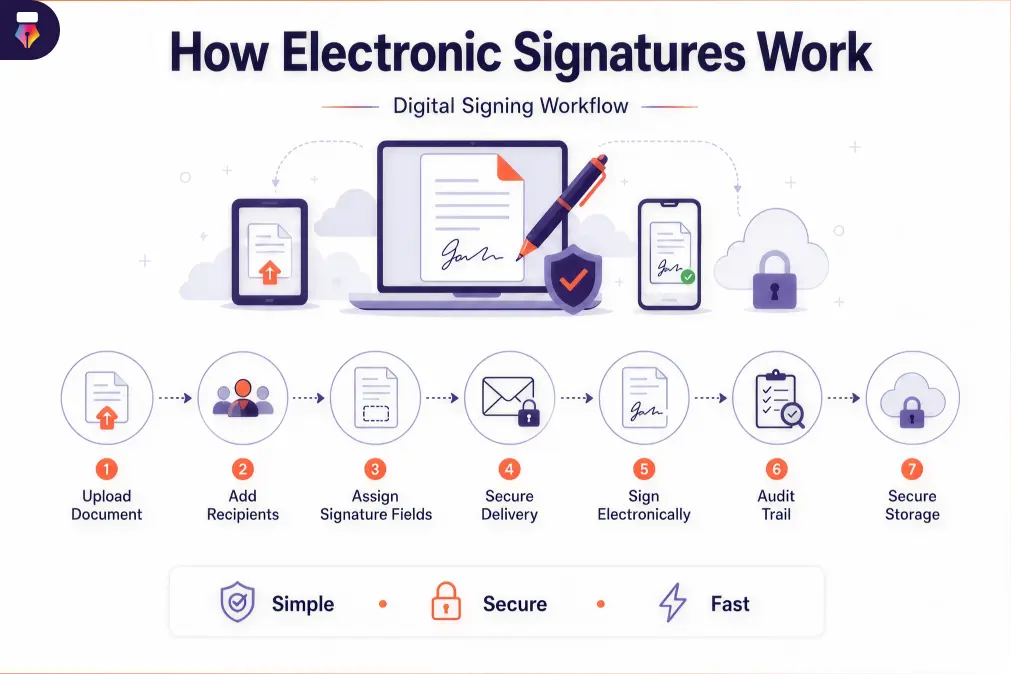
Most electronic signature platforms follow a straightforward workflow:
- Upload the document.
- Add signature fields and recipient information.
- Send the document securely.
- Recipients review and sign electronically.
- The completed document is stored securely with an audit trail.
The entire process can take minutes instead of days, which significantly improves turnaround times for business documents.
Electronic Signature vs. Digital Signature
Although the terms are often used interchangeably, they are not the same thing.
| Electronic Signature | Digital Signature |
|---|---|
| Indicates intent to sign electronically | Uses cryptographic technology to verify authenticity |
| Focuses on user convenience | Focuses on enhanced security and identity validation |
| Commonly used for contracts and approvals | Often required for highly regulated transactions |
| Suitable for most everyday business documents | Preferred for high-security or government-regulated documents |
Both approaches help organizations reduce paperwork while supporting secure document management. Our help center breaks down the difference between electronic and digital signatures in more detail.
Why Businesses Are Moving Away from Paper-Based Signatures
Digital transformation has fundamentally changed how organizations operate. Customers expect faster service, employees increasingly work remotely, and businesses need efficient processes that support growth. Traditional paper-based signing no longer meets these expectations.
Challenges of Paper-Based Document Signing
Paper workflows introduce inefficiencies at nearly every stage of the approval process.
Slow Approval Cycles
Printing, signing, scanning, and mailing documents can delay approvals by several days or even weeks.
High Operational Costs
Businesses spend considerable resources on:
- Paper
- Printing
- Ink
- Courier services
- Physical storage
- Filing cabinets
- Administrative labor
These recurring expenses add up quickly, especially for organizations processing hundreds or thousands of documents each month.
Manual Errors
Paper documents increase the likelihood of:
- Missing signatures
- Incomplete forms
- Incorrect document versions
- Lost paperwork
- Filing mistakes
Correcting these issues often means restarting the approval process from the beginning.
Limited Accessibility
Physical documents can only be signed where they are located. Remote employees, traveling executives, and international clients often experience delays simply because they cannot reach the paperwork.
The Rise of Digital-First Business Operations
Modern organizations increasingly rely on cloud technologies, workflow automation, and digital collaboration tools.
Electronic signatures fit naturally within this ecosystem by allowing businesses to:
- Approve documents remotely
- Automate repetitive tasks
- Improve customer responsiveness
- Reduce administrative overhead
- Support global collaboration
As organizations continue investing in digital transformation, electronic signatures have become a foundational component of paperless operations.
Top Reasons Businesses Are Adopting Electronic Signatures
1. Faster Document Approvals
One of the primary reasons businesses adopt electronic signatures is speed. Traditional signing involves multiple manual steps: printing, mailing, waiting for delivery, signing, scanning, returning documents, and filing paperwork.
Electronic signatures eliminate those delays. Documents can be delivered instantly, signed within minutes, and returned automatically to all parties. For businesses handling contracts, proposals, purchase agreements, or onboarding paperwork, that acceleration significantly improves operational efficiency.
Examples include:
- Sales contracts approved the same day
- HR onboarding completed before an employee's first day
- Vendor agreements finalized without courier delays
Faster approvals also improve customer satisfaction by cutting waiting times.
2. Increased Operational Efficiency
Businesses constantly look for ways to eliminate repetitive administrative work. Electronic signatures automate many manual tasks, including:
- Document routing
- Approval notifications
- Reminder emails
- Status tracking
- Secure document storage
Instead of manually following up with signers, employees can monitor progress through centralized dashboards. Automation reduces bottlenecks and frees staff to focus on higher-value activities rather than paperwork.
3. Lower Business Costs
Paper-based processes carry hidden expenses that many organizations underestimate. Electronic signatures help reduce costs associated with:
- Printing
- Paper consumption
- Ink and toner
- Shipping
- Courier services
- Document storage
- Filing cabinets
- Administrative processing
For organizations processing thousands of documents annually, these savings can be substantial. Digital documents also reduce the need for physical archives, which helps businesses reclaim office space and simplify document management.
4. Improved Security
Security is a major concern when handling contracts, financial documents, employee records, and confidential business information. Modern electronic signature platforms provide multiple layers of security and compliance controls.
Encryption
Documents remain encrypted during transmission and storage to prevent unauthorized access.
Authentication
Businesses can verify signer identities through:
- Email verification
- One-time passwords (OTP)
- Multi-factor authentication
- Identity verification methods
Audit Trails
Every document action is recorded, including viewing history, signing timestamps, IP addresses, user activity, and completion records. A detailed audit trail improves transparency and simplifies compliance reviews.
Tamper Detection
Many electronic signature solutions automatically detect document modifications made after signing, which helps preserve document integrity.
5. Better Regulatory Compliance
Many industries operate under strict regulatory requirements for document handling and record retention. Electronic signature platforms help organizations maintain compliance by providing:
- Secure document storage
- Audit logs
- Authentication records
- Timestamp verification
- Version history
- Controlled document access
Compliance features are particularly valuable in healthcare, finance, legal services, insurance, education, and government. Digital records also simplify audits by letting authorized personnel retrieve signed documents and supporting evidence quickly. For a closer look at the rules involved, see our overview of the legal status of electronic signatures.
6. Enhanced Customer Experience
Today's customers expect fast, convenient, digital-first interactions. Asking clients to print, sign, scan, and email documents creates unnecessary friction and delays important business processes.
Electronic signatures make signing simple and accessible from virtually any device with an internet connection. Customers can review agreements, approve proposals, or complete onboarding forms in a few clicks.
Key customer experience benefits include:
- Faster contract completion
- Mobile-friendly signing
- Reduced paperwork
- Fewer steps in the approval process
- Real-time notifications and updates
A smoother signing experience improves customer satisfaction, reduces abandonment during document workflows, and helps businesses close deals more efficiently.
7. Support for Remote and Hybrid Work
The shift toward remote and hybrid work has transformed how organizations manage documents. Teams are no longer confined to a single office, which makes traditional paper-based approvals impractical.
Electronic signatures let employees, managers, clients, and vendors sign documents securely from any location. This flexibility supports:
- Distributed teams
- International business operations
- Remote employee onboarding
- Cross-border contract approvals
- Faster decision-making
By removing geographical barriers, businesses keep projects moving instead of waiting on physical paperwork.
8. Environmentally Friendly Operations
Sustainability has become an important business priority, and reducing paper consumption is one way organizations can support environmental initiatives while improving operational efficiency.
Electronic signatures contribute to paperless workflows by minimizing the need for:
- Printed contracts
- Paper forms
- Shipping materials
- Physical document storage
Lower paper usage also reduces waste, transportation-related emissions, and the environmental impact of printing and document handling. For organizations with corporate sustainability goals, adopting electronic signatures is a practical step toward more responsible operations.
Business Processes Improved by Electronic Signatures
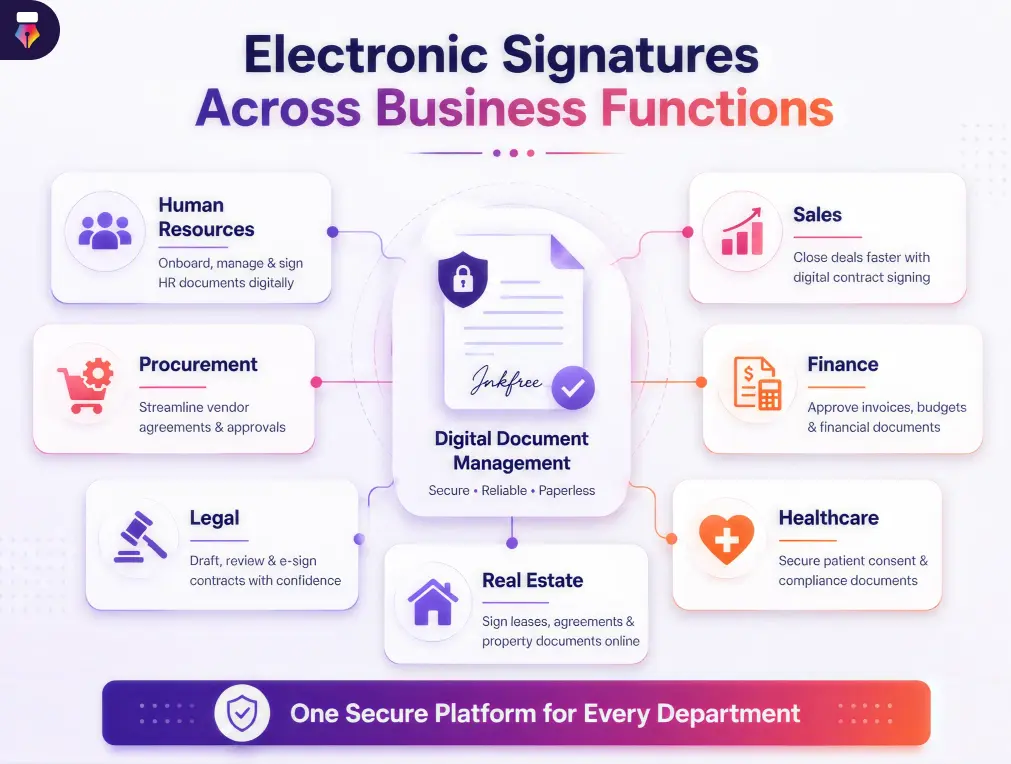
Electronic signatures deliver value across nearly every department. By replacing manual, paper-based approvals with secure digital workflows, businesses improve productivity, reduce delays, and create a smoother experience for employees, customers, and partners.
HR and Employee Onboarding
HR teams manage a large volume of employee documents throughout the hiring and employment life cycle. Traditional paperwork slows down recruitment, onboarding, and compliance processes. Electronic signatures simplify HR operations by letting candidates and employees sign documents online from anywhere.
Common HR documents include:
- Employment contracts
- Offer letters
- Employee onboarding forms
- Non-disclosure agreements (NDAs)
- Company policy acknowledgments
- Benefits enrollment forms
- Performance review documents
- Exit documentation
Digital workflows help HR teams onboard employees faster while maintaining accurate records and reducing administrative work.
Sales and Revenue Teams
Sales teams depend on speed to close deals, and every delay in obtaining signatures can affect revenue and customer satisfaction. Electronic signatures shorten the sales cycle by letting prospects review and sign documents immediately.
Typical sales documents include:
- Sales contracts
- Service agreements
- Quotes and proposals
- Subscription agreements
- Renewal contracts
- Statements of work
Real-time notifications also tell sales representatives exactly when documents are viewed and signed, which enables faster follow-ups.
Procurement and Vendor Management
Procurement teams frequently exchange documents with vendors, suppliers, and contractors. Manual approval processes delay purchasing decisions and disrupt supply chains. Electronic signatures streamline procurement by digitizing:
- Vendor agreements
- Purchase approvals
- Supplier contracts
- Procurement policies
- Service agreements
Faster approvals help businesses maintain efficient vendor relationships and reduce procurement cycle times.
Finance and Accounting
Finance departments handle sensitive documents that require accuracy, security, and compliance. Electronic signatures simplify financial workflows while reducing paper handling and manual processing.
Examples include:
- Purchase orders
- Vendor payment approvals
- Expense reimbursement forms
- Budget approvals
- Financial agreements
- Client invoices
Digital approvals also improve visibility into document status, which helps finance teams manage deadlines more effectively.
Legal and Contract Teams
Legal teams often manage high-value agreements involving multiple stakeholders. Electronic signatures reduce administrative overhead while maintaining document integrity and supporting legal compliance.
Frequently signed legal documents include:
- Contracts
- Non-disclosure agreements
- Partnership agreements
- Licensing agreements
- Service contracts
- Compliance documents
Audit trails and document history provide additional transparency during legal reviews or disputes.
IT and Security Teams
IT teams evaluate, deploy, and govern the eSignature platform every other department relies on. Electronic signatures give IT centralized control over who can send, view, and approve documents, along with the records security reviews depend on.
IT-owned documents commonly include:
- Software license agreements
- Vendor contracts and SLAs
- Security policy acknowledgments
- Data processing agreements
- Asset allocation forms
- User access approval requests
Role-based permissions and organization-wide security settings let IT roll the platform out across every team without losing oversight of who signed what.
Healthcare Practices
Healthcare organizations manage sensitive patient information while complying with strict privacy regulations. Electronic signatures improve document management for:
- Patient consent forms
- Medical record authorizations
- Insurance documentation
- Treatment agreements
- Healthcare provider contracts
Digital workflows reduce paperwork while helping providers deliver faster, more efficient patient services.
Real Estate Transactions
Real estate transactions involve multiple documents that often require signatures from buyers, sellers, agents, lenders, and legal representatives. Electronic signatures accelerate processes such as:
- Property purchase agreements
- Lease agreements
- Rental contracts
- Mortgage documentation
- Disclosure forms
Faster document completion helps transactions move forward without unnecessary delays.
Technology and SaaS Companies
Technology companies run on agreements that route through legal, finance, and security before anyone signs. Electronic signatures shorten the cycle for:
- Master service agreements
- Non-disclosure agreements
- Data processing agreements
- Subscription and renewal contracts
- Contractor and vendor agreements
Approval routing keeps every internal reviewer in order, so sales teams are not chasing sign-off by email while a deal waits.
Key Features Businesses Look for in an Electronic Signature Solution
Electronic signature platforms vary in the capabilities they provide. Choosing the right one means evaluating the features that align with your organization's workflow, security, and compliance requirements.
Document Templates
Frequently used documents can be saved as reusable templates, which reduces preparation time and keeps formatting consistent across departments.
Templates are especially useful for:
- Employment contracts
- Sales agreements
- Vendor contracts
- Client onboarding forms
Multi-Party Signing
Many business documents require signatures from several people. An effective platform should support sequential and parallel signing orders, multiple approvers, and role-based signature assignments. This keeps complex approval processes organized and efficient.
Automated Approval Workflows
Workflow automation eliminates manual routing by sending documents to the next approver automatically.
Benefits include:
- Faster approvals
- Reduced manual follow-up
- Automated reminders
- Better visibility into document status
Automation minimizes delays and improves overall operational efficiency.
Audit Trail
A comprehensive audit trail provides a detailed record of every action taken during signing. Typical audit information includes:
- Document creation date
- Sender details
- Recipient information
- Date and time of each signature
- IP address
- Authentication records
- Completion history
Audit logs are valuable for compliance, dispute resolution, and internal governance.
Identity Verification
Verifying signer identity helps prevent unauthorized access and fraudulent signatures. Common identity verification options include email authentication, one-time passwords, multi-factor authentication, and formal identity checks. Organizations handling sensitive information should prioritize platforms with strong authentication capabilities.
Role-Based Access Control
Different users need different levels of access. Role-based permissions let administrators control who can:
- Create documents
- Send documents
- Sign agreements
- View records
- Edit templates
- Access reports
This strengthens security while supporting internal governance policies.
Mobile Compatibility
Business no longer happens only in the office. A modern solution should let users sign documents on smartphones, review contracts on tablets, track approvals while traveling, and manage workflows from any device. A dedicated mobile app helps teams respond faster wherever they are.
Integration with Business Applications
Electronic signatures deliver greater value when connected to existing business systems. Common integrations include:
- CRM platforms
- HR management systems
- ERP software
- Cloud storage solutions
- Document management platforms
- Productivity tools
These integrations reduce duplicate data entry and create seamless document workflows.
Common Concerns About Electronic Signatures
Although electronic signatures are widely accepted, businesses often have questions before adopting them.
Will They Hold Up Legally?
In many countries, electronic signatures are legally recognized when they comply with applicable laws and regulations. Requirements vary by country, industry, and document type, so businesses should confirm that their chosen solution supports the legal and compliance standards in the regions where they operate.
How Secure Are They Really?
Yes. Reputable platforms are designed with security in mind, and most offer encryption, identity verification, secure cloud storage, audit trails, tamper detection, and access controls. These safeguards help protect sensitive business information throughout the document life cycle.
Can Signed Documents Be Modified?
Modern platforms typically include tamper-evident technology that detects unauthorized changes made after a document has been signed. If modifications occur, the system may invalidate the signature or flag the document, which helps maintain integrity and trust.
What Happens If Someone Refuses to Sign?
If a recipient declines to sign, the sender is usually notified immediately. Many platforms also allow businesses to send reminders, reassign recipients, cancel document requests, or restart the approval process with updated documents. That visibility helps organizations manage document workflows more effectively.
Signs Your Business Is Ready for Electronic Signatures
As businesses grow, managing documents manually becomes increasingly time-consuming. If your organization still relies heavily on paper-based approvals, it may be time to make the switch. Here are the most common signals.
You Handle a High Volume of Documents
If your team regularly processes contracts, agreements, invoices, purchase orders, onboarding forms, or compliance documents, manual signing quickly becomes a bottleneck. Digital workflows, including bulk sending, reduce repetitive administrative effort.
Your Approval Process Is Slow
Waiting days or weeks for signatures delays projects, customer onboarding, vendor agreements, and sales opportunities. Electronic signatures accelerate approvals by letting recipients sign instantly from anywhere.
Your Workforce Is Remote or Hybrid
With employees working across different locations, sending physical documents is no longer practical. Electronic signatures allow distributed teams to collaborate securely without being tied to a specific office.
You Want to Reduce Operational Costs
Businesses looking to spend less on paper, printing, postage, courier services, and physical storage can achieve measurable savings through digital document management.
Compliance and Document Tracking Are Challenging
If your organization struggles to locate signed documents, monitor approval status, or maintain audit records, electronic signature platforms provide centralized storage, audit trails, and real-time tracking.
You Want to Improve Customer Experience
Today's customers expect quick, convenient digital interactions. Simplifying the signing process reduces delays, improves satisfaction, and strengthens business relationships.
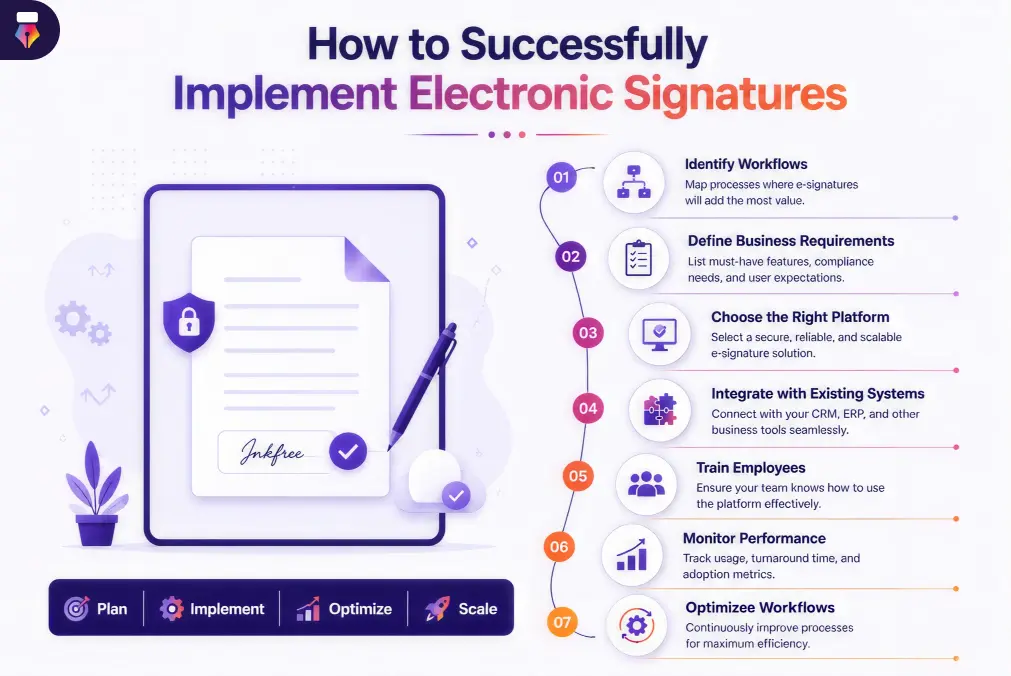
How to Successfully Implement Electronic Signatures
Adopting electronic signatures is about more than replacing handwritten signatures with digital ones. A successful rollout involves planning, selecting the right platform, and preparing your teams for new workflows.
1. Identify Your Document Workflows
Start by evaluating which business processes depend most heavily on document approvals. Common workflows include:
- Employee onboarding
- Customer contracts
- Vendor agreements
- Purchase approvals
- Legal documentation
- Finance approvals
Understanding these workflows helps you prioritize implementation and maximize return on investment.
2. Define Your Business Requirements
Before selecting a solution, consider your organization's needs. Evaluate factors such as number of users, document volume, security requirements, compliance obligations, integration capabilities, mobile accessibility, and scalability. Comparing plans and pricing against both current and future needs helps ensure long-term success.
3. Integrate with Existing Business Systems
Electronic signatures become far more valuable when connected to the software your teams already use. Common integrations include:
- Customer relationship management (CRM) systems
- Human resource management systems (HRMS)
- Enterprise resource planning (ERP) platforms
- Document management systems
- Cloud storage platforms
- Productivity and collaboration tools
Integrated workflows reduce duplicate work, improve data accuracy, and create a seamless user experience.
4. Train Employees
Technology adoption succeeds when employees understand how to use it. Training should cover sending documents for signature, reviewing completed agreements, managing templates, tracking document status, and following security best practices. A well-organized help center makes the first few weeks considerably smoother.
5. Monitor Performance and Optimize Workflows
After implementation, review how electronic signatures are improving operations. Useful metrics include:
- Average document turnaround time
- Approval completion rates
- Number of documents processed
- Printing and postage cost savings
- Customer response times
- Employee productivity improvements
Built-in document tracking makes these numbers easy to gather and highlights where workflows can be tightened further.
The Future of Electronic Signatures
Electronic signatures have evolved from a convenience tool into a critical component of digital business operations. As organizations continue investing in automation and digital transformation, the technology is becoming more intelligent and more deeply integrated.
AI-Powered Document Workflows
Artificial intelligence is beginning to automate repetitive document tasks such as identifying signature fields, extracting document data, classifying contracts, detecting missing information, and routing documents to the right stakeholders. Tools like the Inkfree AI assistant reduce manual effort and improve processing accuracy.
Intelligent Workflow Automation
Future platforms will support increasingly sophisticated automation, including conditional approval workflows, automated reminders and escalations, smart document routing, and business rule automation. This will let organizations manage complex approval processes with minimal manual intervention.
Enhanced Identity Verification
As cybersecurity threats evolve, identity verification methods are becoming more advanced. Businesses can expect broader adoption of biometric authentication, multi-factor authentication, government-issued identity verification, and AI-assisted fraud detection. These capabilities will further strengthen trust and document security.
Deeper Integration Across Business Ecosystems
Electronic signatures are increasingly part of broader digital ecosystems rather than standalone tools. Organizations are connecting them to CRM platforms, ERP systems, HR software, procurement solutions, accounting applications, customer portals, and cloud collaboration platforms. This integrated approach streamlines the entire document life cycle, from creation through secure storage.
Continued Global Adoption
As more countries establish legal frameworks for electronic signatures and more businesses embrace paperless operations, adoption is expected to grow across industries and organizations of every size. Companies that invest in digital document workflows today will be better positioned to support remote work, improve customer experiences, and respond to changing business needs.
Where to Start With Electronic Signatures
Electronic signatures have become a fundamental part of modern business operations, letting organizations replace slow, paper-based processes with secure, efficient digital workflows. Whether the goal is accelerating contract approvals, simplifying employee onboarding, improving customer experiences, or supporting remote teams, the benefits extend across virtually every department.
As businesses continue their digital transformation, adopting electronic signatures is no longer just about convenience. It is about improving productivity, strengthening compliance, reducing operational costs, and staying competitive in an increasingly digital marketplace.
By selecting the right electronic signature software and integrating it into existing business systems, organizations can streamline document management, improve collaboration, and build more agile, future-ready operations. Start signing with Inkfree and see how much faster your approvals can move.
Questions, answered.Everything you need to know about Why Businesses Are Adopting Electronic Signatures
Businesses adopt electronic signatures to accelerate document approvals, reduce paperwork, improve operational efficiency, lower costs, strengthen security, and support remote collaboration.
In many jurisdictions, electronic signatures are legally recognized when they meet applicable legal and regulatory requirements. Businesses should verify compliance based on their country, industry, and document type.
Electronic signatures are widely used across industries, including human resources, finance, legal services, healthcare, real estate, procurement, education, insurance, and sales.
They eliminate manual paperwork, automate approval workflows, reduce document turnaround times, minimize administrative tasks, and improve collaboration across teams.
Reputable electronic signature solutions typically include encryption, authentication, audit trails, access controls, and tamper-evident technology to help protect sensitive business documents.
Yes. Businesses can lower expenses associated with paper, printing, postage, physical storage, and manual document handling while improving overall productivity.
Yes. Most modern electronic signature platforms allow users to review and sign documents securely from smartphones, tablets, and laptops, which makes them well suited to remote and hybrid work environments.
Electronic signatures can be used for a wide range of business documents, including employment contracts, sales agreements, vendor contracts, purchase orders, NDAs, consent forms, invoices, and onboarding documents, subject to applicable legal requirements.