
Read Receipts on Every Document
Know exactly when a recipient opens your signing request, including every view.
Document tracking shows where each request stands: when it was delivered, opened, signed, or declined, with per-signer status and a full activity timeline.
Document tracking in Inkfree is automatic from the moment you hit send.
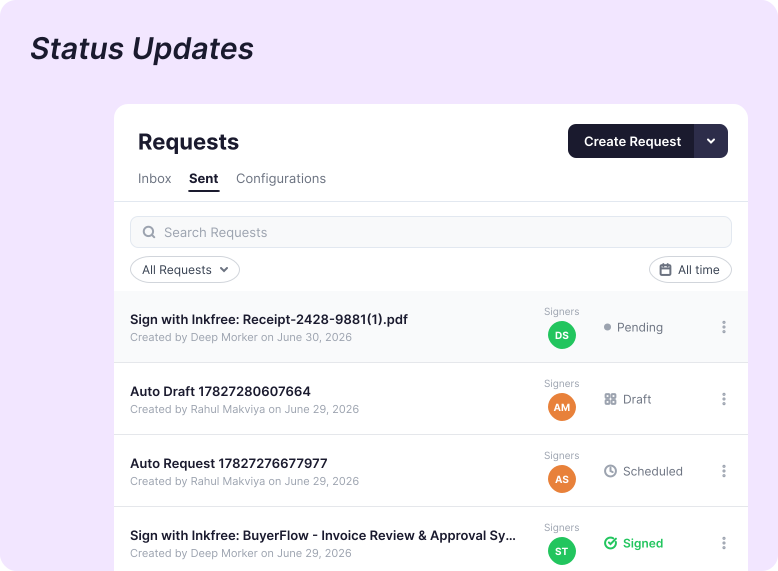
Replace status-check emails with real-time visibility across every document.
From real estate closings to HR onboarding, Inkfree fits the way your team already works.
Don't see your industry?
Browse All SolutionsEvery document in your Inkfree dashboard shows a real-time status reflecting exactly where it is.
Document delivered to the signer's inbox. The signing request has been dispatched and the recipient's email successfully reached.
The signer has opened and viewed the document at least once. Inkfree logs the exact date, time, and view count.
The signer has begun completing fields or placing their signature. Not yet fully executed.
The document is awaiting action from one or more signers. Not yet opened or acted upon by the next required party in the sequence.
An automatic or manually triggered reminder has been dispatched to one or more outstanding signers.
All required parties have signed. Document fully executed and a Certificate of Completion generated and distributed.
A signer chose to decline rather than sign. Sender is notified immediately and the document is removed from the active queue.
The signing window elapsed without all required signatures. The link is no longer active and a resend is required.
Sender or administrator canceled the document before all signatures were collected. All parties are notified immediately.
An internal approver rejected the document and sent it back for revision. The workflow does not advance until the rejection is resolved.
All required internal approvers have signed off. The document has cleared every review stage and is ready for external signers.
All tracking features available across every Inkfree plan.
Real-time document status updates
Read receipts with open time and view frequency
Per-signer status in multi-party documents
Full activity timeline per document
Automatic reminder triggers based on signing status
Manual one-click reminder sending
Audit trail as part of every completed document
Team usage reports and completion-rate tracking
Organization-wide analytics dashboard
Average turnaround-time reporting
Exportable reports for management and compliance reviews
Yes. Inkfree read receipts notify you the moment a signing request is opened, showing the exact time of opening and how many times the document has been viewed.
Yes. You receive an instant notification the moment each signature is applied, and again when all parties have completed and the document is fully executed.
Yes. For documents with multiple signers or a defined signing order, your dashboard shows the status of each individual party, signed, pending, or next.
Yes. The activity timeline is captured as part of the tamper-evident Certificate of Completion, a court-admissible audit trail with timestamps and party identity.
Yes. Team usage reports and document activity data can be exported for management reviews, compliance audits, or operational planning.
Declined means an external signer chose not to sign. Rejected means an internal approver in an approval workflow sent the document back for revision before it could proceed.
Real-time document tracking and analytics give you the visibility to manage every signing workflow with precision, knowing exactly where every document stands, every step of the way.

