Best eSignature Software for Businesses in 2026
 Vatsal GotiLast Updated: Sep 28, 2026
Every eSignature tool promises the same thing: send a document, get it signed, save time. Finding the best eSignature software for your business depends on details buried further down, in the pricing tiers, the envelope caps, and the fine print on which authentication methods and integrations are locked behind the top plan.
We looked at the eSignature platforms businesses are comparing in 2026, checked their pricing and plan details against their own websites, and pulled out what matters most when you are the one signing the contract. This is not a ranked list. It is a comparison built around one question: which tool fits the way your business sends and signs documents.
What to Compare Before You Pick a Platform
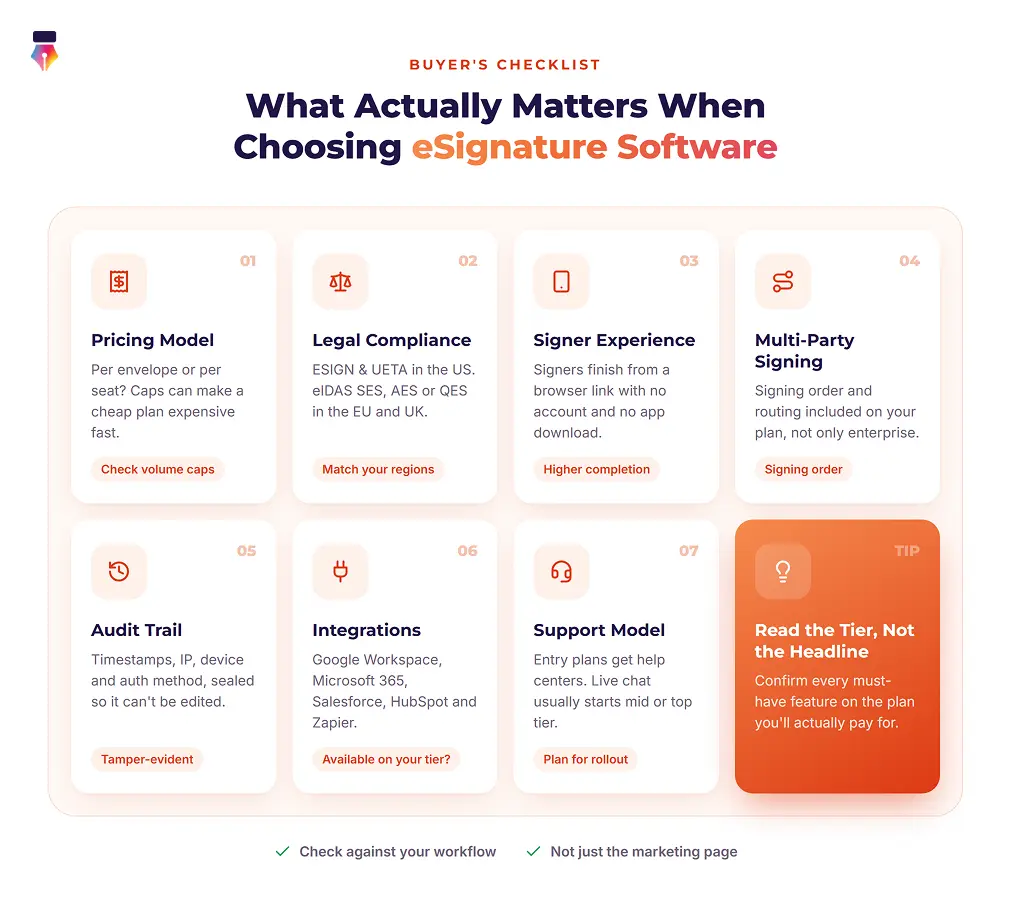
The factors that separate a good fit from an expensive mistake are usage limits, legal coverage, signer experience, routing, evidence, integrations and support. Check each one against your own workflow, not just the marketing page.
- How the vendor counts usage. Some platforms cap envelopes or sign requests per month or per year (DocuSign, Adobe Acrobat Sign, SignNow). Others include unlimited sending once you reach a mid-tier plan (Zoho Sign, Signeasy, Inkfree). If your team sends a high volume of contracts, an envelope cap can turn a cheap-looking plan into an expensive one fast.
- Legal compliance where you operate. In the US, look for ESIGN Act and UETA compliance. If you sign with counterparties in the EU or UK, check whether the platform supports eIDAS, and whether it offers only Simple Electronic Signatures (SES), which cover most everyday business contracts, or also the Advanced and Qualified levels that some regulated industries require. Not every platform supports the higher levels, so confirm this before you commit if your industry needs it.
- Signer experience. The person signing your document is usually your client, candidate or vendor, not a customer of the platform. If they have to create an account, download an app or fight a clunky mobile screen, completion rates drop. Look for tools that let signers finish from a browser link with no signup.
- Multi-party and sequential signing. If documents go to several people in a set order, such as an employee, then a manager, then HR, confirm that signing order and routing are included in the plan you will actually pay for, not only in the enterprise tier.
- Audit trail and evidence. Every reputable platform generates an audit trail, but the depth varies. A strong one logs timestamps, IP addresses, device information and the authentication method, and is cryptographically sealed so it cannot be edited after the fact.
- Integrations you will use. Google Workspace, Microsoft 365, Salesforce, HubSpot and Zapier connections save real time. Check that the integration you need is available on your plan tier, not just mentioned somewhere on the pricing page.
- Support model. Free and entry-level plans usually route you to a help center and email, while live chat and dedicated support tend to start at the mid or top tier. If you will need hands-on help during rollout, factor that into the tier you choose.
Best eSignature Software for Businesses in 2026: Comparison Table
Pricing below reflects publicly listed rates as of September 2026. Vendors change pricing often, sometimes more than once a year, so confirm current numbers on each provider's own pricing page before you buy.
| Platform | Starting price | Free plan | Envelope or sign limits | Best for |
|---|---|---|---|---|
| DocuSign | About $10/month (Personal, annual billing) | No, 30-day trial | 5/month (Personal); about 100/user/year (Standard, Business Pro) | Large organizations that need the widest integration ecosystem |
| Adobe Acrobat Sign | About $14.99/month (bundled with Acrobat Standard) | Limited (Acrobat Reader) | About 150 transactions/user/year on team plans | Teams already using Acrobat for PDF editing |
| PandaDoc | $0 (Free eSign) | Yes, 5 documents/month | Unlimited signing from Starter | Sales teams sending proposals and quotes, not just signatures |
| Dropbox Sign | $0 (Free) | Yes, 3 requests/month | Unlimited on paid plans (Standard needs 2 or more users) | Teams already using Dropbox for file storage |
| SignNow | $8/user/month (Business, annual billing) | No, 7-day trial | 100 invites/user/year on every plan | Budget-conscious teams that mainly need core signing |
| Zoho Sign | $0 (Free) | Yes, 5 envelopes/month | 25 envelopes/user/month (Standard); unlimited from Professional | Teams in the Zoho ecosystem or wanting a low paid entry price |
| Signeasy | $10/month (Personal) | No, 14-day trial | 5 documents/month (Personal); unlimited from Business | Solo professionals and small teams wanting simple pricing |
| Inkfree | $0 (Free forever) | Yes, 3 sign requests/month | 10/month (Basic); unlimited from Standard | Teams wanting unlimited sending and workflow features without enterprise pricing |
The Platforms, One by One
DocuSign
DocuSign is the name most people already associate with eSignatures, and its integration library (900+ partner apps, according to its own marketing) is the deepest in the category. Plans run Personal (about $10/month on annual billing, capped at 5 envelopes a month), Standard (about $25/user/month) and Business Pro ($40/user/month), with the paid team tiers including about 100 envelopes per user per year. Advertised prices require annual billing, and Enterprise pricing is custom.
DocuSign has no free plan, only a 30-day trial. It is a strong choice if your business needs Salesforce-grade integrations or DocuSign's contract lifecycle management (CLM) add-on, which is sold separately from eSignature. For teams that just need to send and sign, the per-user cost climbs quickly as you add seats, so check your real envelope volume against the annual cap before you commit. For a feature-by-feature breakdown, see Inkfree vs DocuSign.
Adobe Acrobat Sign
Adobe does not sell Acrobat Sign as a standalone self-serve product for individuals. It is bundled into Acrobat Standard and Pro, starting around $14.99 to $19.99/month for individuals, while the team plans are $16.99/license/month (Acrobat Standard) and $23.99/license/month (Acrobat Pro) on annual billing, with team tiers commonly capped around 150 transactions per user per year. Enterprise Acrobat Sign Solutions are sold separately with custom pricing.
It makes the most sense for organizations already paying for Acrobat's PDF editing tools that want signing folded into that subscription rather than running a separate app. If you do not already use Acrobat for document editing, you are likely paying for PDF features you will not use just to reach the signing functionality.
PandaDoc
PandaDoc is built around full document creation, not just signing: proposals, quotes and contracts with a built-in editor, plus eSignatures on top. Its Free eSign plan allows up to 5 documents a month with up to 2 recipients each. Starter is $19/user/month on annual billing (about $35 billed monthly) and includes unlimited eSignatures, Business is around $49/user/month, and Enterprise pricing is custom.
If you only need signatures on documents you created elsewhere, PandaDoc's document builder will mostly go unused, and a simpler tool will cost less. For sales teams building proposals and quotes that also need signatures and payment collection in the same workflow, its combined toolset is a genuine time-saver. See Inkfree vs PandaDoc for how the two compare.
Dropbox Sign
Dropbox Sign (formerly HelloSign) has a Free plan with 3 signature requests a month. Essentials is $15/month for a single sender ($10.05/month billed yearly) with unlimited signature requests, and Standard is $25/user/month ($17.50/user/month billed yearly) with a two-user minimum, so a solo user who wants Standard's features pays for two seats. Premium is custom-priced. Its API is billed as a separate product from the web app, so teams building signing into their own product should check both pricing pages.
It is a solid fit if your team already works inside Dropbox for file storage, since the signing workflow sits close to the files you already manage there.
SignNow
SignNow, part of airSlate, is one of the cheapest entry points into a full eSignature workflow: Business is $8/user/month on annual billing ($20 billed monthly), Business Premium is around $15/user/month and Enterprise around $30/user/month. Every plan, Enterprise included, is capped at 100 signature invites per user per year, with a charge for each invite beyond the cap. There is no permanent free plan, only a 7-day trial.
SignNow is a reasonable choice for solo operators and small teams that want signing order, templates and mobile signing without paying DocuSign or Adobe prices. Its parent company also sells a separate workflow automation product, airSlate WorkFlow, priced independently, if you outgrow simple signing. See Inkfree vs SignNow for a closer comparison.
Zoho Sign
Zoho Sign offers a genuinely usable Free plan (one user, 5 envelopes a month). Standard is around $10/user/month with 25 envelopes per user per month, Professional around $16/user/month with unlimited envelopes, and Enterprise around $22/user/month, which adds bulk send and advanced forms, all billed annually.
It is one of the lowest-priced options with unlimited sending once you reach Professional, and it integrates natively with the wider Zoho suite, including CRM and Books. Teams outside the Zoho ecosystem still get a capable, affordable signing tool, though the deeper workflow benefits are strongest for teams already using Zoho products.
Signeasy
Signeasy prices per user with no free plan, only a 14-day trial: Personal is $10/month, Business $20/user/month and Business Pro $30/user/month, with custom pricing for teams of 5 or more seats. Personal caps sending at 5 documents a month, and unlimited documents start at Business. HIPAA support is available as an add-on on Business Pro and on custom plans. Signeasy integrates with Gmail, Google Workspace, Microsoft 365 and HubSpot.
It is a straightforward option for small teams that want to avoid envelope caps and do not need a free tier to get started. See Inkfree vs Signeasy for a side-by-side view.
Inkfree
Inkfree is an end-to-end agreement platform rather than just a signature tool, and signing order is included on every plan, Free included. The Lifetime Free plan covers 1 user and 3 sign requests a month. Basic is $15 per seat/month for 1 user with 10 sign requests and 3 templates. Standard is $35 per seat/month for up to 5 users with unlimited sign requests and templates, and adds scheduled sending, passcode and OTP authentication, and the AI Assistant. Business is $50 per seat/month for teams of more than 5 users and adds approval workflows, bulk send, web forms, custom branding, in-person signing and Single Sign-On (SSO). Annual billing takes 25% off every paid plan.
Inkfree is a reasonable fit for small and mid-sized businesses that want workflow features such as signing order and approval routing without paying enterprise prices, and Standard's unlimited sign requests avoid the envelope caps found on several competing platforms. Inkfree supports Simple Electronic Signatures under eIDAS, so teams that need Advanced or Qualified Electronic Signatures, or deep Adobe and Salesforce integrations, should check whether its current capabilities meet their requirements. The full plan breakdown is on the Inkfree pricing page.
Which eSignature Software Fits Your Business?
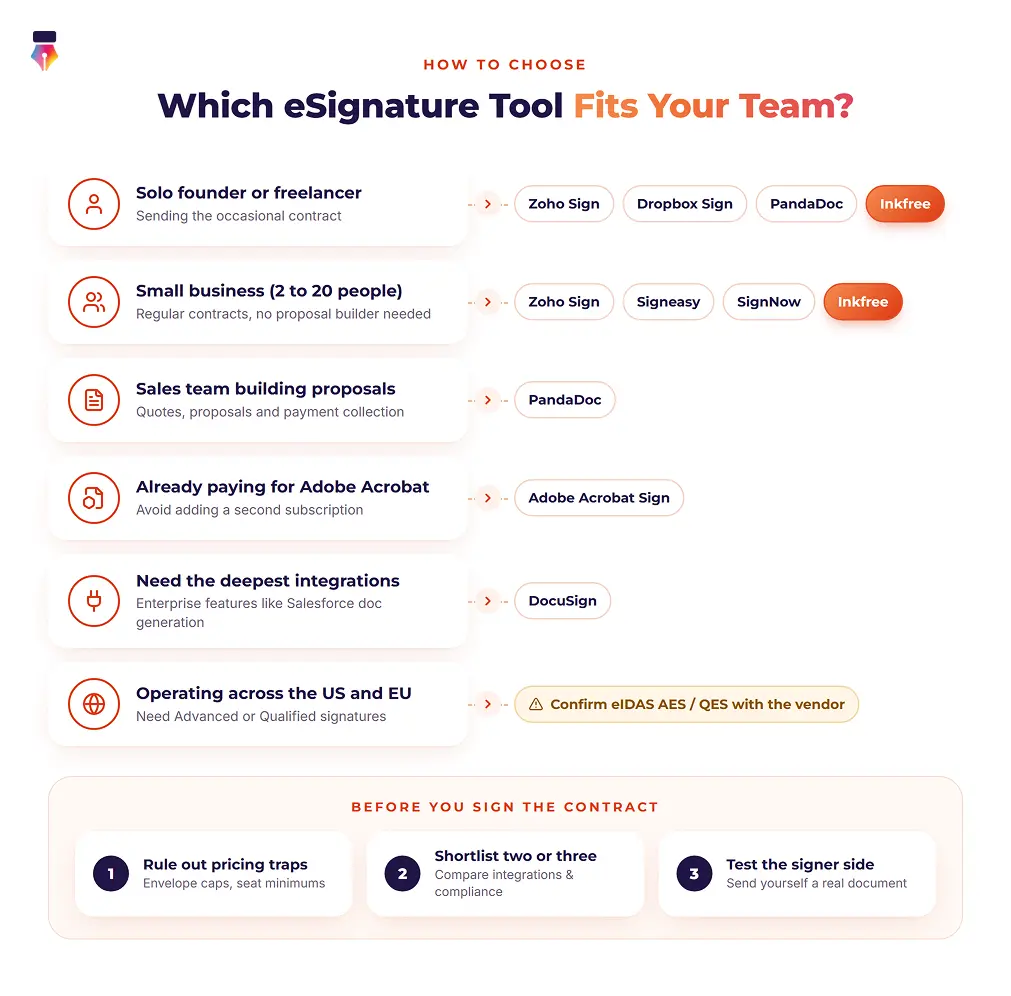
The right platform depends on how often you send, what you already use, and whether you need document creation or just signing. Find the situation closest to yours.
- You are a solo founder or freelancer sending the occasional contract. A free tier from Zoho Sign, Dropbox Sign, PandaDoc or Inkfree will likely cover you. Check the monthly document cap against how many contracts you actually send.
- You are a small business (2 to 20 people) that sends contracts regularly but does not need a proposal builder. Zoho Sign, Signeasy, SignNow and Inkfree all offer unlimited or high-volume sending on their mid-tier plans. Compare them on the integrations you need (Google Workspace, Microsoft 365, your CRM) and the authentication options you need (OTP, passcode).
- You are a sales team that builds proposals and quotes, not just contracts. PandaDoc's document editor and payment collection inside the signing flow will likely save more time than a pure eSignature tool.
- You already pay for Adobe Acrobat or rely on the Adobe ecosystem. Adobe Acrobat Sign avoids adding a second subscription.
- You need the deepest integration catalog or enterprise features such as Salesforce document generation. DocuSign's ecosystem is the most extensive, at a higher price.
- You operate across the US and EU and need Advanced or Qualified electronic signatures. Confirm eIDAS AES and QES support directly with the vendor. Several platforms in this comparison, Inkfree included, support Simple Electronic Signatures under eIDAS but not the higher assurance levels, so check this before you sign a contract with any provider.
Finding the Best eSignature Software for Your Team
There is no single best eSignature software for every business. The right choice depends on your sending volume, the tools your team already uses, and whether you need document creation or just clean, reliable signing. Start by ruling out platforms whose pricing model (envelope caps, seat minimums) does not match how your team sends documents, then compare the two or three that remain on integrations, compliance coverage for the regions you operate in, and how easy signing is for the people on the other end of your contracts.
If you want unlimited sign requests and built-in workflow features such as signing order, approval routing and bulk send without jumping to enterprise pricing, Inkfree's plans are worth a look alongside the others in this comparison, and you can try it free before committing to a paid tier.
Questions, answered.Everything you need to know about Best eSignature Software for Businesses in 2026
Yes. In the United States, electronic signatures are legally binding under the federal ESIGN Act and, at the state level, under UETA, which 49 states have adopted. In the European Union, eIDAS governs electronic signatures: Simple Electronic Signatures are valid for most commercial transactions, while certain higher-risk uses require Advanced or Qualified Electronic Signatures. Support for those higher eIDAS levels varies by provider, so confirm it directly if you need it.
Several platforms offer usable free tiers, including Zoho Sign, Dropbox Sign, PandaDoc, and Inkfree. They are typically limited to one user and 3 to 5 documents or envelopes a month, which works for occasional signing but runs out quickly for a business that sends contracts every week.
Per-envelope pricing caps how many documents you can send, so a cheap-looking plan can become expensive once your volume grows or you pay overages. Plans with unlimited sending, such as Zoho Sign Professional, Signeasy Business, and Inkfree Standard and Business, make costs more predictable when your volume changes from month to month.
No, not on the platforms in this comparison. Signers typically receive a secure email link and complete the signature in a browser on any device without creating an account or downloading an app. This usually holds on free tiers too.
Based on current public pricing, SignNow and Zoho Sign have the lowest paid entry points, from about $8 to $10 per user per month on annual billing. Zoho Sign, Dropbox Sign, PandaDoc, and Inkfree also offer free tiers for very low volume. Compare envelope caps as well as the headline price.
Most platforms handle standard HR paperwork such as offer letters, NDAs, and policy acknowledgments. In healthcare, check whether the vendor will sign a Business Associate Agreement and offers HIPAA support on your plan, because that is separate from general eSignature legality. Inkfree does not currently offer HIPAA support.