Document Approval Workflow: A Practical Guide for Teams
 Vatsal GotiLast Updated: Oct 7, 2026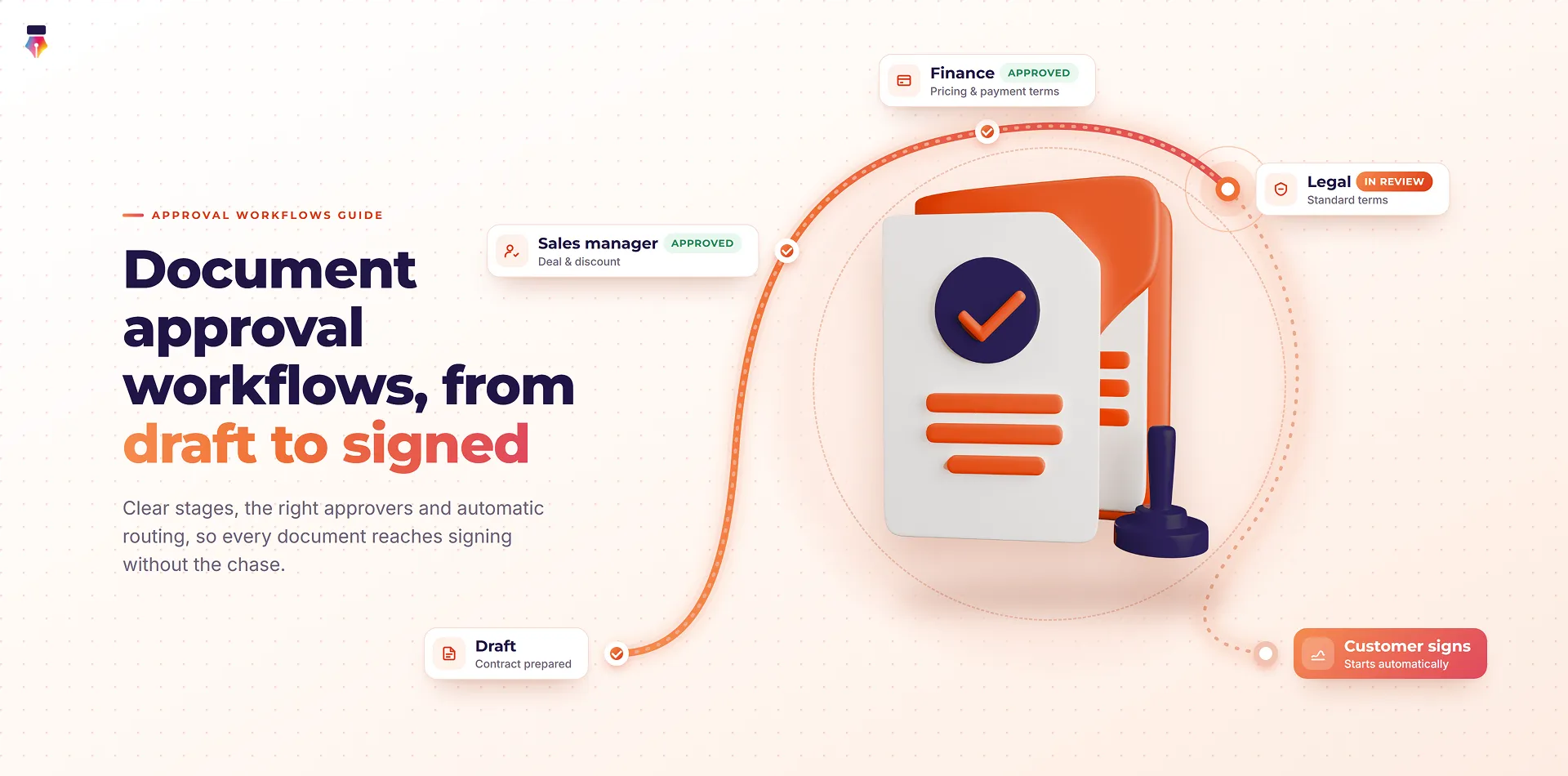
Key Takeaways: Document Approval Workflows
- A document approval workflow is the defined path a document follows, from draft to final sign-off, with clear stages, owners and rules for each step.
- Good workflows separate internal approval (your team agrees the document is ready) from external signing (the other party agrees to it).
- Most approval delays come from three problems: no one knows whose turn it is, documents are forwarded by email, and nobody is sure who needs to re-approve after a change.
- Automated routing addresses all three: approvers hear about a document only when it reaches them, it advances on its own, and each decision is logged.
- Start simple. Map your current process, remove stages that add no value, then save the workflow as a template so every document follows it the same way.
A document approval workflow is the fixed, repeatable path a document takes through internal reviewers before it is finalized or sent for signature. Every business has documents that need a "yes" from more than one person before they go out. A sales contract needs finance to check the pricing and legal to check the terms. An offer letter needs the hiring manager and HR. A purchase order needs a budget holder. In many teams, that "yes" is collected by forwarding emails, chasing people on chat and hoping nobody approves an old version.
This guide explains how approval workflows work, how to design one that people actually follow, and how to connect approvals to signing so a document goes from draft to fully executed without manual hand-offs. Where useful, we show how this works in Inkfree approval workflows.
What Is a Document Approval Workflow?
A document approval workflow is a set sequence of review steps that a document must pass before it is finalized. Each step has:
- An owner: the person or group who must review the document.
- A decision: approve, or reject with a reason so the document can be fixed.
- A trigger: what happens next once the decision is made.
The workflow defines the order of those steps and the rules for moving between them. In a manual process, a person carries the document from step to step. In an automated workflow, the system does it: when one approver finishes, the next one is notified straight away.
Approval vs Signing: Why the Difference Matters
Internal approval and external signing are two separate stages, and mixing them up is one of the most expensive mistakes in document handling:
- Internal approval happens inside your organization. Its purpose is to confirm that the document is correct and authorized before anyone outside sees it. Approvers review the document and approve or reject it.
- External signing happens with the other party. Its purpose is to make the agreement binding. Signers sign.
Keeping them distinct prevents sending a contract for signature before pricing or terms have been approved internally. In a well-designed workflow, external signing begins only after internal approval is complete. If you want the legal side of that final step, our guide on whether an e-signature is legally binding covers the ESIGN Act, UETA and eIDAS.
Why Do Approval Processes Break Down?
Approval processes usually break down because nobody owns the routing: the document moves only when a person remembers to move it. In most teams, the same problems appear again and again:
- No visibility. Nobody can say where a document is or who is holding it, so the sender spends time asking.
- Email forwarding. Each approver forwards the file to the next, creating several versions and no single source of truth.
- Approvals out of order. A director signs off before finance has checked the numbers, and the approval has to be repeated.
- Unclear revisions. When someone asks for a change, it is unclear who has already approved and whether they need to see it again.
- No record. When an auditor asks who approved a discount or a contract change, the answer is buried in someone's inbox.
You can see how these problems play out across departments in our overview of common business use cases for eSignatures.
The Building Blocks of an Approval Workflow
Every approval workflow, whether it has two steps or ten, is built from the same six parts.
1. Stages
A stage is one review step. A simple workflow might have one stage (a manager approves). A more complex one might have several (team lead, then finance, then legal, then a director). Add only as many stages as the decision genuinely needs.
2. Approvers and Approver Groups
Each stage is owned by a person or a group. Groups are useful when any one of several people can approve (for example, any member of the finance team), or when everyone in the group must approve (for example, both co-founders). In Inkfree, an approver group can be set to an any one member approves or all members must approve rule.
3. Routing Rules
Routing rules decide how the document moves between stages. The main patterns are:
| Routing pattern | How it works | When to use it |
|---|---|---|
| Sequential | Each stage starts only when the previous one is complete | When later approvers depend on earlier checks, such as finance before legal |
| Parallel | Several people review at the same time | When reviews are independent and speed matters |
| Mixed | Some stages run in sequence, some in parallel | Complex documents with independent and dependent checks |
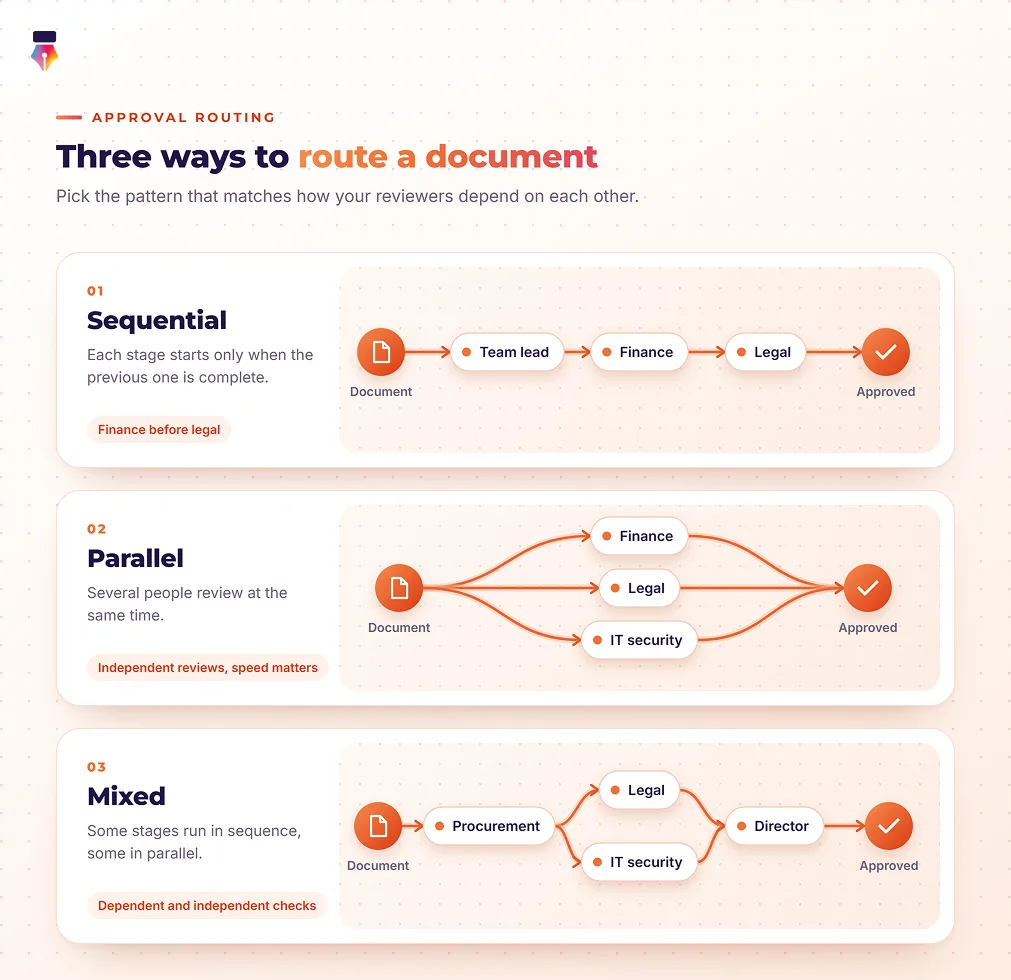
Sequential routing is the default for most approval chains because it guarantees that each approver sees a document that has already passed the earlier checks.
4. Decisions and Revisions
At each stage, the approver either approves, and the document moves on, or rejects it with a note explaining what needs to change. In Inkfree, a rejection stops the request and returns the reason to the sender, who fixes the document and sends it again. Clear revision handling is what separates a workflow people trust from one they work around.
5. Notifications and Reminders
An approver should get an alert at the moment the document reaches their stage, not before. Reminders nudge anyone who has not acted, so the sender does not have to chase.
6. The Audit Trail
Every approval, rejection and note should be recorded with a timestamp and the approver's identity. This is your evidence of who authorized what, and when. In Inkfree, these events sit in the same audit trail and certificate of completion as the signatures.
How to Design a Document Approval Workflow, Step by Step
Designing a document approval workflow takes seven steps: map what happens today, cut what adds nothing, fix the order, define each approval, connect it to signing, save it, and refine it.
Step 1: Map the Current Process
Pick one document type, such as customer contracts, and write down what happens today. Who sees it, in what order, and why? Include the informal steps, such as "I always run it past Sam first." You will often find that the real process differs from the one people describe.
Step 2: Remove Stages That Add No Value
For each stage, ask: what does this person check that nobody else does? If the answer is "nothing," remove the stage or make that person a CC recipient who receives a copy of the final document instead of approving it. Fewer stages means faster approvals.
Step 3: Decide the Order
Put stages that can block the document early. If finance might reject the pricing, finance should approve before legal spends time on the terms. Use parallel review only where reviewers check genuinely independent things.
Step 4: Define What "Approved" Means at Each Stage
Write a one-line description of each approver's responsibility, such as "Finance confirms pricing and payment terms match the approved quote." This helps approvers focus and makes rejection notes more specific.
Step 5: Connect Approval to Signing
Once internal approval is complete, the document should go to external signers automatically. This is where controlling who signs and when comes in: you can set signers to sign one after another, all at once, or in a combination of both. Our help article on sequential vs parallel signing explains the trade-offs.
Step 6: Save It as a Template
Once the workflow works, save it. A reusable template keeps the approval chain and signing order, so every document of that type follows the same path, whoever sends it.
Step 7: Review and Refine
After a month, look at where documents wait the longest. A stage that consistently holds documents for days is a sign that the approver is overloaded, the responsibility is unclear, or the stage is unnecessary.
Document Approval Workflow Examples
The right workflow depends on the document and the risk involved. Here are four common patterns you can adapt.
Sales Contract
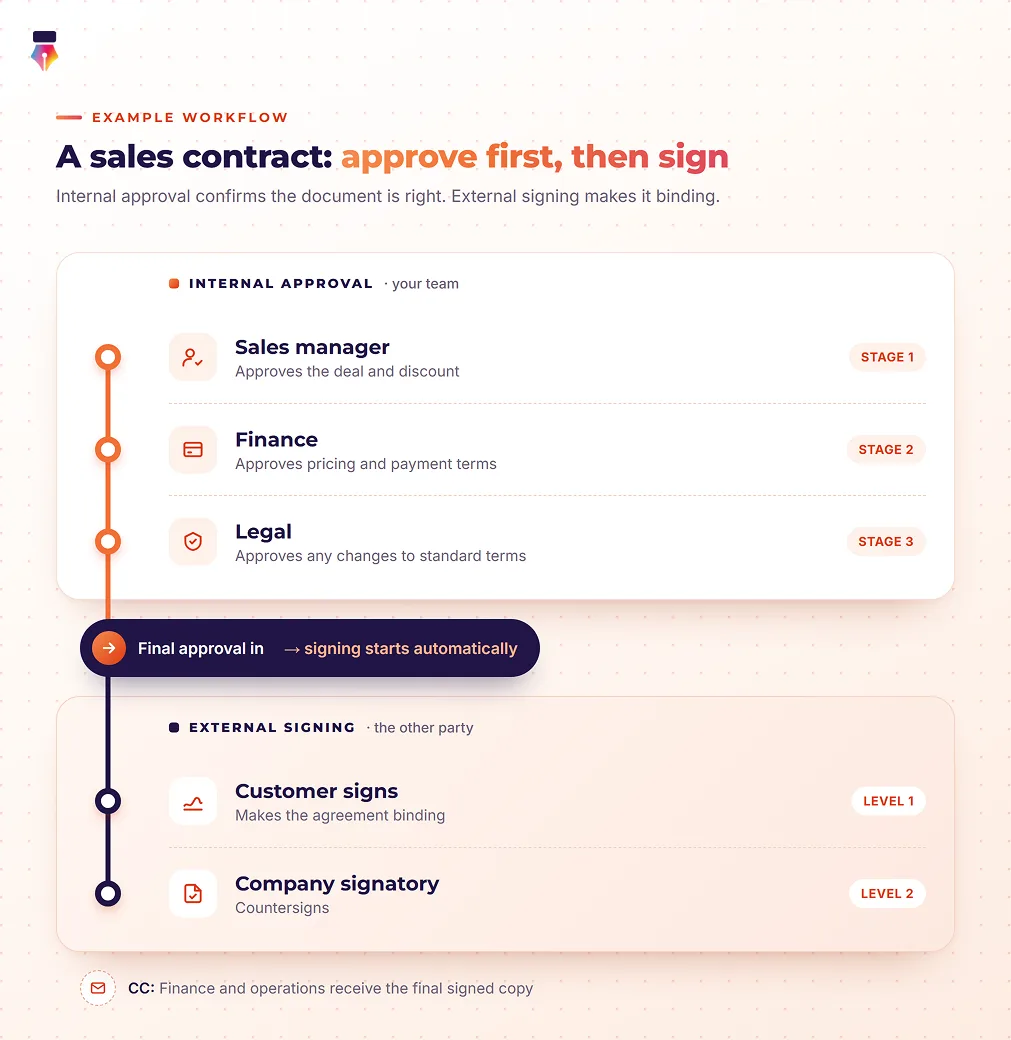
- Sales manager approves the deal and discount.
- Finance approves pricing and payment terms.
- Legal approves any changes to standard terms.
- Customer signs.
- Company signatory countersigns.
- Finance and operations are CC'd on the final signed copy.
Employee Offer Letter
- Hiring manager approves the role and start date.
- HR approves salary and benefits against the approved band.
- Candidate signs.
- The payroll inbox is CC'd on the signed letter.
Purchase Order
- Budget holder approves the spend.
- Finance approves (an approver group where any one finance team member can approve).
- Supplier signs to confirm the order.
Vendor or Partner Agreement
- Procurement approves the commercial terms.
- Legal and IT security review in parallel, as their checks are independent.
- Director gives final approval.
- Vendor signs, followed by the company signatory.
Manual vs Automated Approval Workflows
An automated approval workflow enforces the order, the version and the record that a manual email chain leaves to chance.
| Aspect | Manual (email and chat) | Automated workflow |
|---|---|---|
| Routing | Each person forwards the file | The document moves to the next stage automatically |
| Knowing whose turn it is | Ask around | The next approver gets an alert as soon as the previous stage closes |
| Version control | Several copies in several inboxes | One document, one current version |
| Order enforced | Relies on people following instructions | Later stages cannot start until earlier ones are complete |
| Revisions | Unclear who needs to re-approve | Rejected with a reason, fixed and sent again |
| Record of approvals | Scattered across emails | Timestamped audit trail with approver identity |
| Consistency | Depends on who sends the document | Same workflow every time, saved in a template |
How to Build a Multi-Step Approval and Signing Workflow in Inkfree
Inkfree combines internal approvals and external signing in a single send. Approval workflows are part of the Business plan. In outline, the setup looks like this (see the full walkthrough on building a multi-step workflow):
- Add approvers. On the Approvers tab, add each reviewer in the order they should review, or add an approver group with an any one or all rule. Nothing else happens until approval is given.
- Set the signing order. Turn on signer order and arrange signers into levels. For example: level 1, the employee; level 2, two managers signing in parallel; level 3, a director.
- Add identity verification. Require a one-time passcode or an access code for external signers where the document calls for it.
- Add CC recipients. Include stakeholders such as finance or an archive mailbox so they automatically receive the final signed document.
- Set reminders and expiration. Automatic reminders keep the workflow moving, and an expiration date closes requests that are no longer needed.
After you send it, the document reaches each approver in turn. They review it in a read-only view and approve or reject it with a note, and the final approval hands the document straight to your signers. You can follow progress live from the dashboard, and the audit trail keeps a timestamped entry for every stage.
Common Approval Workflow Mistakes to Avoid
The most common approval workflow mistakes add delay without adding any real check:
- Too many approvers. Every extra stage adds delay. If someone only needs to know about a document, CC them instead.
- Using parallel approval for dependent checks. If legal's review depends on finance's numbers, run them in sequence.
- No owner for the workflow itself. Someone should be responsible for keeping each template's approval chain up to date when people change roles.
- Approving outside the system. A "looks good" message on chat leaves no record. Ask approvers to approve in the workflow so it is recorded.
- Sending for signature before approval. Build approval into the template so signing cannot start until it is complete.
Build Your First Approval Workflow Free
With Inkfree, documents move through your approval chain on their own, the right reviewer is alerted at the right moment, every decision lands in the audit trail, and signing begins as soon as the last approval is in. Every new account starts with a 14-day free trial that includes approval workflows, so you can create a free account and route your first document today, or see Inkfree approval workflows in action first.
Questions, answered.About designing, routing and reusing document approval workflows
The document approval process is the series of reviews a document must pass before it is finalized or sent for signature. Each reviewer checks a specific aspect, such as pricing, legal terms or budget, and either approves it or rejects it with a reason. An automated approval workflow runs that process for you.
Approval routing is the set of rules that decides who reviews a document and in what order. Routing can be sequential (one approver after another), parallel (several at the same time) or a mix of both.
As few as the decision requires. Most business documents need between one and three internal approval stages. If a stage does not check something that no other stage checks, remove it.
In Inkfree, the request stops and the sender is notified with the approver's reason. Signers are never contacted, so nobody outside your organization sees the rejected version. The sender fixes the document and sends it again, and the rejection is recorded in the audit trail.
Yes. In Inkfree, you can embed an approval chain and signing order in a document template, so every document sent from that template follows the same workflow automatically, regardless of who sends it.
Approvers are usually internal reviewers who confirm a document is ready. They review it and approve or reject it, but they do not sign. Signers are the parties who make the document binding by signing it. In a typical workflow, approvals happen first and signing starts automatically once they are complete.